What is an ASIN? Amazon's product ID, explained for sellers
An ASIN is the Amazon Standard Identification Number, a unique 10-character code of letters and digits that Amazon gives every product in its store. It identifies one product inside Amazon and nowhere else. You never create one yourself: Amazon assigns it when a product detail page is first created.
Key takeaways
- An ASIN is ten characters, usually starting "B0". Books are the exception and start with a digit.
- The fastest way to find one is to read the product page address, right after /dp/.
- Every variation has its own child ASIN; the parent only holds the family together, up to 2,000 children.
- You cannot create or change an ASIN. If the product already exists, you are required to list on its code.
- An ASIN is not a UPC. You bring a GTIN to Amazon; Amazon gives the listing its ASIN.

What is an ASIN?
It is an identifier that lives only inside Amazon, and it identifies one specific product variant.
Amazon's own definition is a 10-character mix of letters and digits that identifies an item in its catalog. Outside Amazon it does nothing: no bookshop, library or distributor uses it to find a product.
Each specific variant gets its own code, so the small grey version and the large sand version of the same bowl are different ASINs. Amazon also uses the code as the key in many of its advertising and retail reports, which is why it ends up being the unit sellers measure by.
What does ASIN stand for, and what does one look like?
Amazon Standard Identification Number, written as ten characters that usually begin with "B0".
Books are the exception: a book ASIN starts with a digit, and for a book the code generally matches its ISBN. Amazon's own guide gives two examples, B07FZ8S74R for a typical product and 0451524934 for a book.
There is no meaning hidden in the other eight characters. They are not a category, a date or a seller code, so there is nothing to decode.
How do you find an ASIN?
Four ways, and the fastest is simply to read the product page address.
- Read the URL. On any product page the code sits in the address right after /dp/.
- Scroll to the details. Most pages list it in the Product Details area, near the size and manufacturing information.
- Open Seller Central. Your own codes are on the Manage All Inventory page.
- Search for it. Typing an ASIN into the Amazon search bar lands you on that exact product.
How do parent and child ASINs work?
Products that come in several sizes or colours form a family: each variant is a child with its own code, and the parent holds them together.
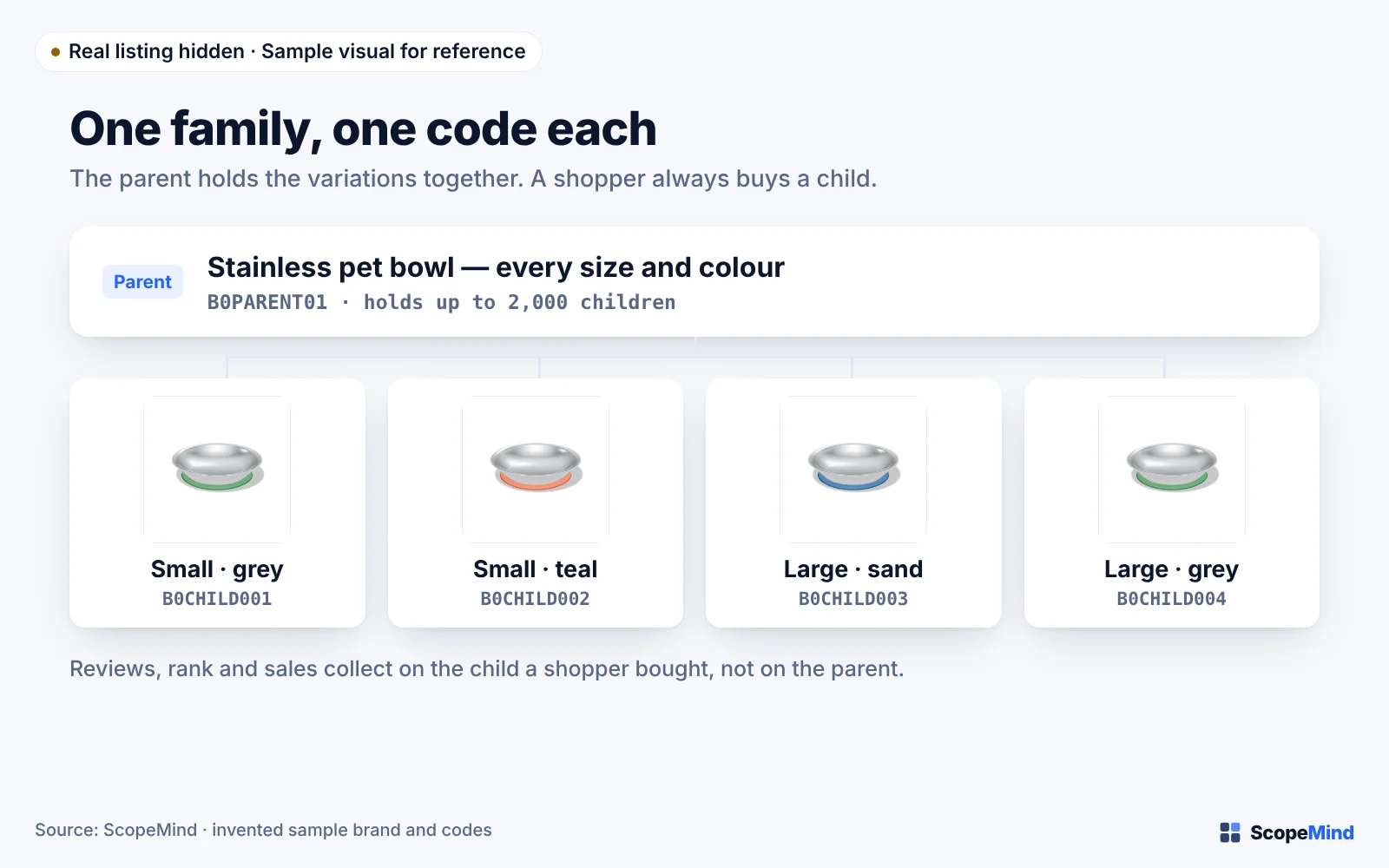
Child ASINs are what a shopper actually buys. The parent is not purchasable; it exists so the variations sit on one page and so performance can be read across the family. One parent can hold up to 2,000 children.
This matters when you measure. Reviews, rank and sales collect on the child that was bought, so judging a product by its best-selling variant alone hides what the rest of the family is doing. Our guide to listing optimization covers how to read a change across a family rather than one code.
Can you create a new ASIN, or do you use an existing one?
You never type one in. Amazon generates the code when a product detail page is created, and if the product is already listed you are required to sell on the code that exists.
Which path you take depends on whether the product is already in the catalog:
- Already listed. You sell on the existing code. In Seller Central, go to Catalog, then Add Products, and search by product ID to match it. One ASIN often carries several sellers, which is exactly how reselling works.
- New to Amazon. If the search finds nothing, choose "Create a new listing" and Amazon assigns a fresh code to the new page.
- Rebranding. A new name does not earn a new code. You ask for the existing ASIN to be updated instead.
A new listing normally needs a product ID, a GTIN. If you buy the product in, ask the manufacturer for it; if you made it yourself, get one from GS1. Products without an ID may qualify for an exemption, which you apply for from the "I don't have a product ID" option, with the product's name and photos of every side of the item and its box.
So can you use someone else's ASIN? Yes, when you genuinely sell the same product. What you cannot do is open a second code for a product that already has one.
ASIN vs UPC, EAN, ISBN and SKU: what is the difference?
They all identify products. What separates them is who issues the code and how far it reaches.

| Code | What it is | Where it works |
|---|---|---|
| ASIN | Ten letters and digits, assigned by Amazon when an item is listed | Only inside Amazon |
| GTIN | Global Trade Item Number, up to 14 digits, usually behind a barcode | Wherever the product is sold |
| UPC | A type of GTIN, the standard product identifier | Wherever the product is sold |
| EAN | A type of GTIN used in the European market | Wherever the product is sold |
| ISBN | A type of GTIN for books, usually tied to a publication | The global standard for books |
| SKU | A code a company sets for its own stock | Inside one business |
Two practical points follow. An ASIN is not a UPC: you bring a UPC or another GTIN to create a listing, and Amazon gives that listing its ASIN. And Kindle ebooks are a special case, since each one gets an ASIN automatically through KDP and needs no ISBN, while print books still need an ISBN to be sold anywhere else.
Why is the ASIN the unit you measure?
Because everything that decides whether a product sells collects on it.
Reviews, ratings, rank and sales data all gather on the code, and that data feeds back into search position. Price, title and images all move at this level too. So when something changes, on your listing or a competitor's, the question worth asking is what it did to that ASIN's position and sales.
Three habits make that readable:
- Track your own and your competitors' ASINs on one schedule, so changes line up on a single timeline instead of being noticed whenever someone looks.
- Log every listing change with a date, so a before-and-after comparison is possible at all.
- Watch the whole family, not only the best-selling child, since grouping the variants is what makes the performance readable.
Working on the listing itself? Our bullet point guidelines cover the format rules, and the guide to the Buy Box explains how several sellers on one ASIN compete for the same sale.
Frequently asked questions
- What does ASIN stand for on Amazon?
- Amazon Standard Identification Number. It is a 10-character code of letters and digits that Amazon gives to every product in its store.
- How do I find my ASIN?
- Look in the product page address, right after /dp/. You can also scroll to the Product Details area of the page. For your own products, open Manage All Inventory in Seller Central.
- Can I use someone else's ASIN on Amazon?
- Yes, if you sell the same product. When a code already exists, you are required to list on it, and several sellers sharing one ASIN is normal. What you cannot do is open a second code for the same item.
- Is an ASIN the same as a UPC?
- No. A UPC is a global product number that works wherever the item is sold. An ASIN is issued by Amazon and only means something inside Amazon. You bring a UPC to create the listing; Amazon gives the listing its ASIN.
- Is an ASIN the same in every Amazon marketplace?
- Not always. The same product sold in Japan and the United States can carry a different code in each marketplace. Check the ASIN separately in every country you sell in.
- Can I change my ASIN?
- No. Even a rebrand keeps the same code. Amazon will not issue a second ASIN for a product that already has one, so you ask for the existing listing to be updated instead.
Track any ASIN, yours and your competitors'
ScopeMind records the listings you watch every day and shows what each change did to rank and sales.
Start tracking ASINs