How to track your competitors' Amazon listings
To track a competitor's Amazon listing, record its title, bullets, images, A+ content, price, coupon, reviews, Best Sellers Rank and keyword positions once a day, and keep the history. Then read each change next to what happened to their rank and yours. By hand this works for a few listings; beyond that, use a tool.
Key takeaways
- Watch the whole listing, not only price and rank. Image, title and A+ changes are often the first sign of a competitor's next push.
- Check daily. Coupons and price tests often last only a few days, so a weekly check sees where they ended up, not how they got there.
- Keep the history. One change tells you little; the order of changes tells you what a competitor is testing.
- Filter out Amazon noise. Many reported image and A+ changes are not edits at all.
- Turn every change into one of three decisions: ignore it, watch it, or respond.
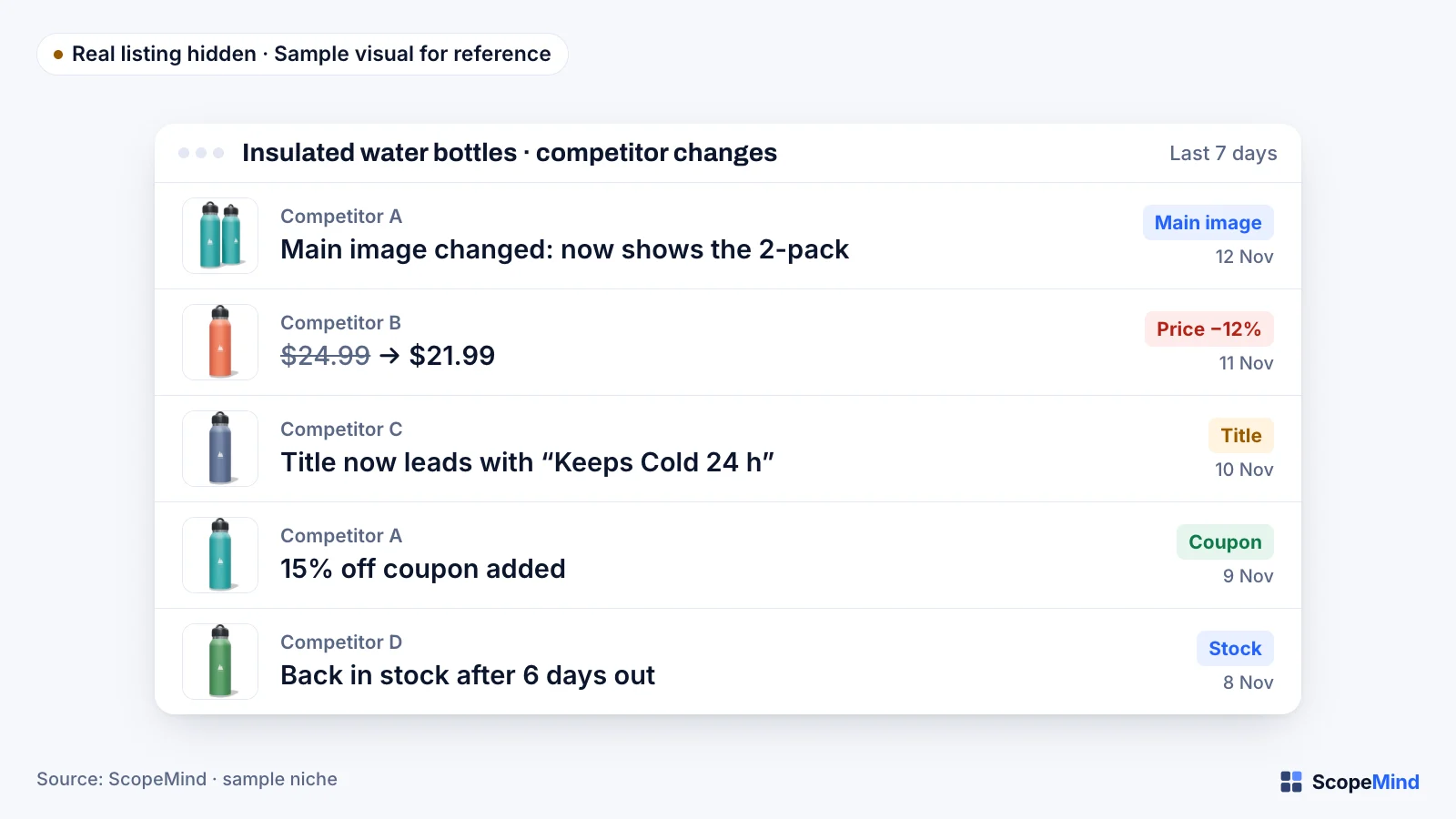
What should you track on a competitor's Amazon listing?
Track every part of the listing a shopper sees, plus the three numbers that show whether it worked: Best Sellers Rank, keyword positions and stock.
Each element tells you something different. A price change is a short-term move. A new main image or title is a bet on more clicks that plays out over weeks. Rank and keyword positions are the scoreboard.
| Element | What a change usually means | When it shows in rank |
|---|---|---|
| Title | A new keyword target, or a rewrite for Amazon's 75-character title limit | One to three weeks |
| Bullets and Item Highlights | New claims or a new angle on who the product is for | Weeks |
| Main image | A test for more clicks from search results | One to three weeks |
| Other images and video | New proof, sizes or use cases | Weeks |
| A+ content | New brand story, comparison chart or claims | Weeks |
| Price | A price test, a clearance, or defending rank | Days |
| Coupon and deals | A short push for rank, often around a launch or an event | Days |
| Reviews and rating | Review speed, or reviews merged or removed | Ongoing |
| Best Sellers Rank | The result of everything above | Daily |
| Keyword positions | Where their traffic comes from, organic and sponsored | Daily |
| Stock and seller count | Out of stock is a window for you; new sellers can mean a price war | Hours to days |
How often should you check competitor listings?
Once a day is the right rhythm for most sellers.
Coupons, lightning deals and price tests often run for only a few days. A weekly check shows you where a competitor ended up but not the steps in between, and the steps are what tell you their plan. Checking more than once a day rarely changes a decision, because rank and conversion need days to respond anyway.
Before big events such as Prime Day or Black Friday, keep the daily rhythm but read the changes as they come in. That is when competitors move fastest.
Which competitors should you track?
Your real competitors are the products that rank for your keywords, not the ones in your category.
- List the three to five search terms that bring you most of your sales.
- Search each one and note the products on page one that sell a comparable product at a comparable price.
- Add sponsored products that appear on several of your terms. A competitor buying your keywords is a direct competitor.
- Keep the list to five to fifteen products per product of yours, and check it again every month for newcomers.
How do you track competitor listings by hand?
With a spreadsheet, a daily routine and screenshots. It works for a handful of listings.
- Make one row per competitor per day, with columns for title, price, coupon, review count, rating and Best Sellers Rank.
- Take a screenshot of the main image and save it with the date in the file name.
- Search your main keywords in a private browser window, from the same delivery location each time, and note each competitor's position.
- Compare with yesterday's row and mark what changed.
- Once a week, read down each competitor's rows to see the order of their changes.
The weak points are the parts that are hard to see at a glance: a changed bullet, a new A+ module, a second gallery image swapped out. A screenshot history is also hard to compare across weeks. Past five or so competitors, the routine tends to slip, and the days it slips are often the days that mattered.
What should a competitor tracking tool catch?
A good tool records every part of the listing daily, keeps the full history and shows each change next to what happened to rank.
Many tools watch price, rank and the Buy Box. Fewer watch the whole listing. When you compare tools, check for these:
- Every listing element: title, bullets, every image, A+ content, price, coupon, reviews, rank and stock.
- A daily history you can scroll back through, with before and after for each change.
- Real changes separated from Amazon noise, so the feed only shows edits a seller actually made.
- Changes next to rank and keyword movement, on one timeline.
- Organic and sponsored positions shown apart, so you can tell earned rank from paid placement.
- A way to measure your own changes against what competitors did in the same weeks.
- Grouping by niche, so you read a market rather than a list of products.
- Plain-language summaries, for when you want to know what happened without reading every row.
ScopeMind was built around this list. It records every tracked listing daily, detects each change, filters out Amazon noise and shows the change on the same timeline as rank and keyword positions.
How do you tell a real change from Amazon noise?
Check whether the content changed, or only the file or the order behind it.
Amazon regularly re-uploads the same image under a new file ID, reorders the products inside an A+ comparison chart, and shows a sibling variant's image while a variant is out of stock. Each of these looks like a change in raw data, but the shopper sees the same page.
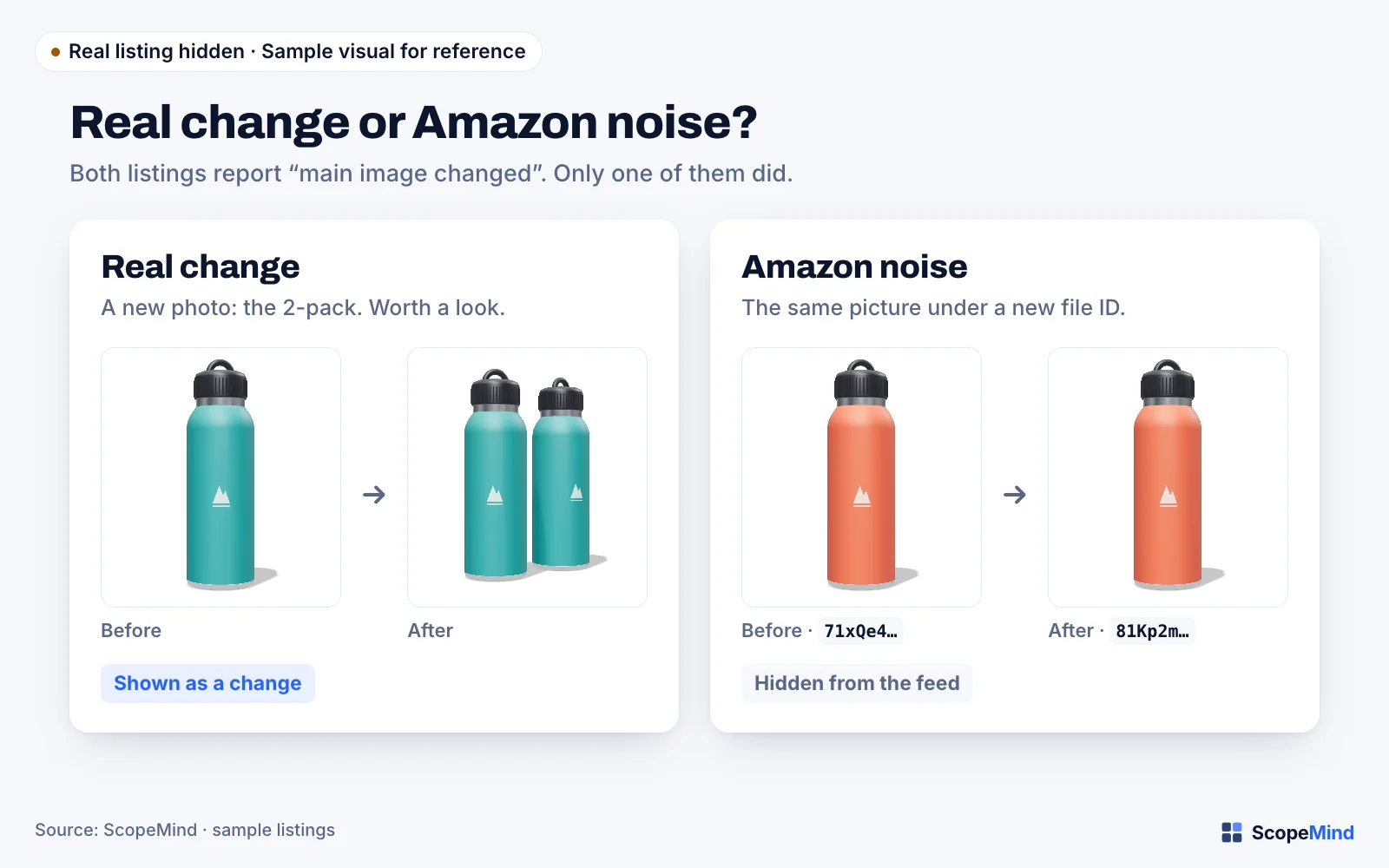
How big the problem is: on one large watchlist we track, 600 of the 799 A+ changes reported over 60 days were only the comparison chart's products changing order. Nothing a shopper would notice had changed.
How we measured this
ScopeMind Research, one watchlist of about 1,700 tracked products across several marketplaces, 60 days in autumn 2026. A reported A+ change counted as noise when the text, images, alt text, videos and the set of products in the comparison chart were all the same before and after, and only the order inside the chart differed.
What should you do when a competitor changes their listing?
Read the change in the context of their earlier changes, then decide: ignore, watch or respond.
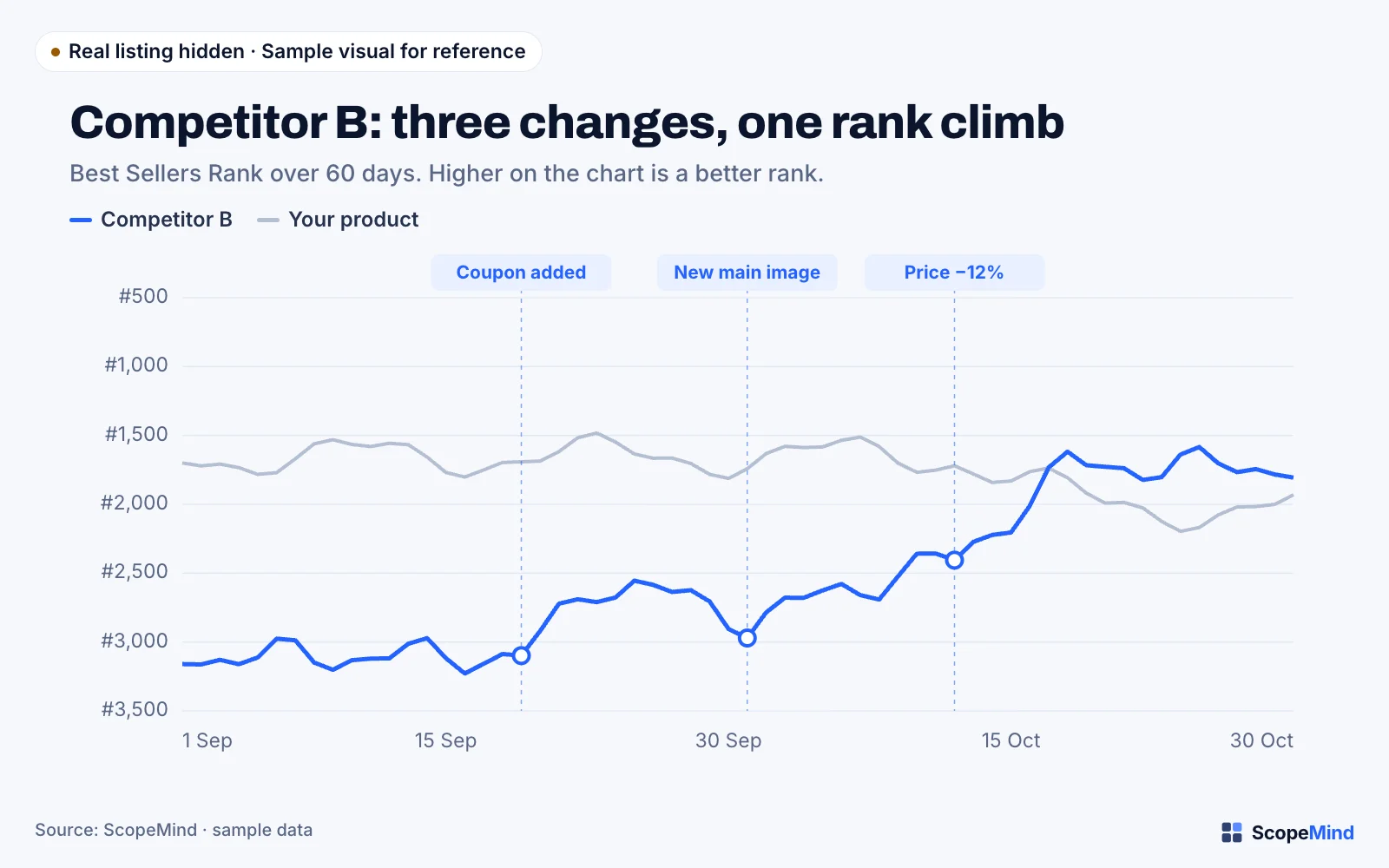
A single change rarely tells the full story. In the sample below, a coupon, a new main image and a price cut came one after another, and the rank climb came only after the third step. Seen one at a time, none of them looked like a threat.
| Competitor change | What to watch | A sensible first move |
|---|---|---|
| Price cut over 10% | Their rank, and your sessions, over the next week | Don't match straight away. Respond only if your own sales move. |
| Coupon added | How long it runs and whether rank follows | Usually wait. Most coupons are short pushes. |
| New main image | Their rank over two to three weeks | Look at your own main image next to theirs in search results. |
| Title rewritten | Which search term they added or moved forward | Check your own position on that term. |
| Out of stock | How long it lasts | Raise ads on the keywords you share while it lasts. |
| New claim in bullets or A+ | Whether shoppers respond to it | If the claim is also true of your product, show your proof. |
When you change your own listing in response, measure it against what competitors did in the same weeks. A simple before and after will mislead you if a competitor ran a coupon at the same time.
How do you set up competitor tracking in ScopeMind?
Create a niche from a keyword, pick the competitors, and changes arrive on your dashboard from the next day.
- Create a niche and type one of your main search terms. ScopeMind shows the products ranking for it, and you tick the ones to watch.
- Add the search terms you care about, to follow your position and your competitors' positions every day.
- Read changes on the dashboard each morning. Every change shows before and after, next to rank.
- When you change your own listing, use Track Impact to measure the result against what competitors did in the same period.
- Ask the Niche Analyst questions such as "what did competitors change before their rank went up?" and get an answer in plain language.
Frequently asked questions
- Can a competitor see that I am tracking their listing?
- No. Tracking reads the public product page, the same one any shopper sees. Nothing is sent to the seller and nothing shows up in their Seller Central.
- Is it allowed to track competitor listings on Amazon?
- Yes. Product pages are public, and watching what changes on them is ordinary market research. What you must not do is copy a competitor's images, text or brand content into your own listing.
- How many competitors should I track per product?
- Five to fifteen. Take the products that rank on page one for your main keywords at a similar price, and add any newcomer that keeps appearing. More than that and the important changes get lost.
- How long does a competitor's change take to affect their rank?
- Price cuts and coupons usually show in Best Sellers Rank within a few days. Title, image and A+ changes tend to take one to three weeks, because they work through click-through and conversion first.
- What is the difference between competitor tracking and A/B testing?
- An A/B test, such as Amazon's Manage Your Experiments, tests two versions of your own listing. Competitor tracking shows what other sellers are testing and how the market moved, so you know what to test next and can read your own results in context.
See every change your competitors make
ScopeMind records your competitors' listings every day and shows you what changed, next to their rank and yours.
Start tracking listing changes