Amazon bullet points guidelines: length, rules and examples
Amazon's bullet points guidelines ask for up to five short bullets, each starting with a capital letter and describing one feature or benefit of the product. Emojis, decorative symbols, prices, guarantees, links and contact details are not allowed. For bullets that shoppers read, lead with the benefit and follow with the detail that makes it believable.
Key takeaways
- Use all five bullets, and give each one a single feature or benefit.
- Keep each bullet to about 100 to 200 characters. A shopper on a phone sees only the first lines.
- Leave out emojis, symbols, prices, guarantees, links and contact details. Amazon can remove or rewrite bullets that include them.
- Start with the benefit, then give the detail that makes it believable.
- When a competitor rewrites their first bullet, it usually shows which benefit they now think sells the product.
What are Amazon's bullet points guidelines?
They are a short set of rules on how bullets are written and what they may not contain.
The bullets appear on the product page under the heading "About this item". Amazon tightened the rules in August 2024 and can remove or rewrite bullets that break them. The table lists the rules that matter most.
| Rule | What Amazon asks for |
|---|---|
| Number | At least three bullets; most sellers can add five |
| Length | Between 10 and 255 characters each as a general rule; some categories accept more |
| Start | A capital letter |
| Form | A short phrase, not a full paragraph, with no full stop at the end |
| Content | One feature or benefit of the product per bullet, and no bullet repeated |
| Symbols | No emojis and no decorative or special characters |
| Promises | No refund or guarantee wording, and no price, shipping or promotion details |
| Contact | No links, company information or contact details |
Limits differ by category. Check the edit page for your own product, and read Amazon's product detail page rules in Seller Central before you publish.
How many bullet points can you have on Amazon?
Five for most sellers, and it is worth using all of them.
Each empty bullet is a reason to buy that you did not give. If you cannot think of a fifth, look at the questions shoppers ask on your listing and on your competitors' listings. A question that keeps coming back is a bullet you are missing.
How long should Amazon bullet points be?
About 100 to 200 characters each: long enough for a benefit and its proof, short enough to read on a phone.
Amazon's general guidance is 10 to 255 characters per bullet, and some categories accept longer ones. The limit is not the target. On a phone, the product page shows only the first lines of the bullets before a shopper has to tap for more, so the opening words of each bullet do most of the work.
If a bullet runs long, it usually holds two points. Split it, or move the detail to the product description or A+ content.
What is not allowed in Amazon bullet points?
Anything that decorates, promises or sells beyond the product itself.
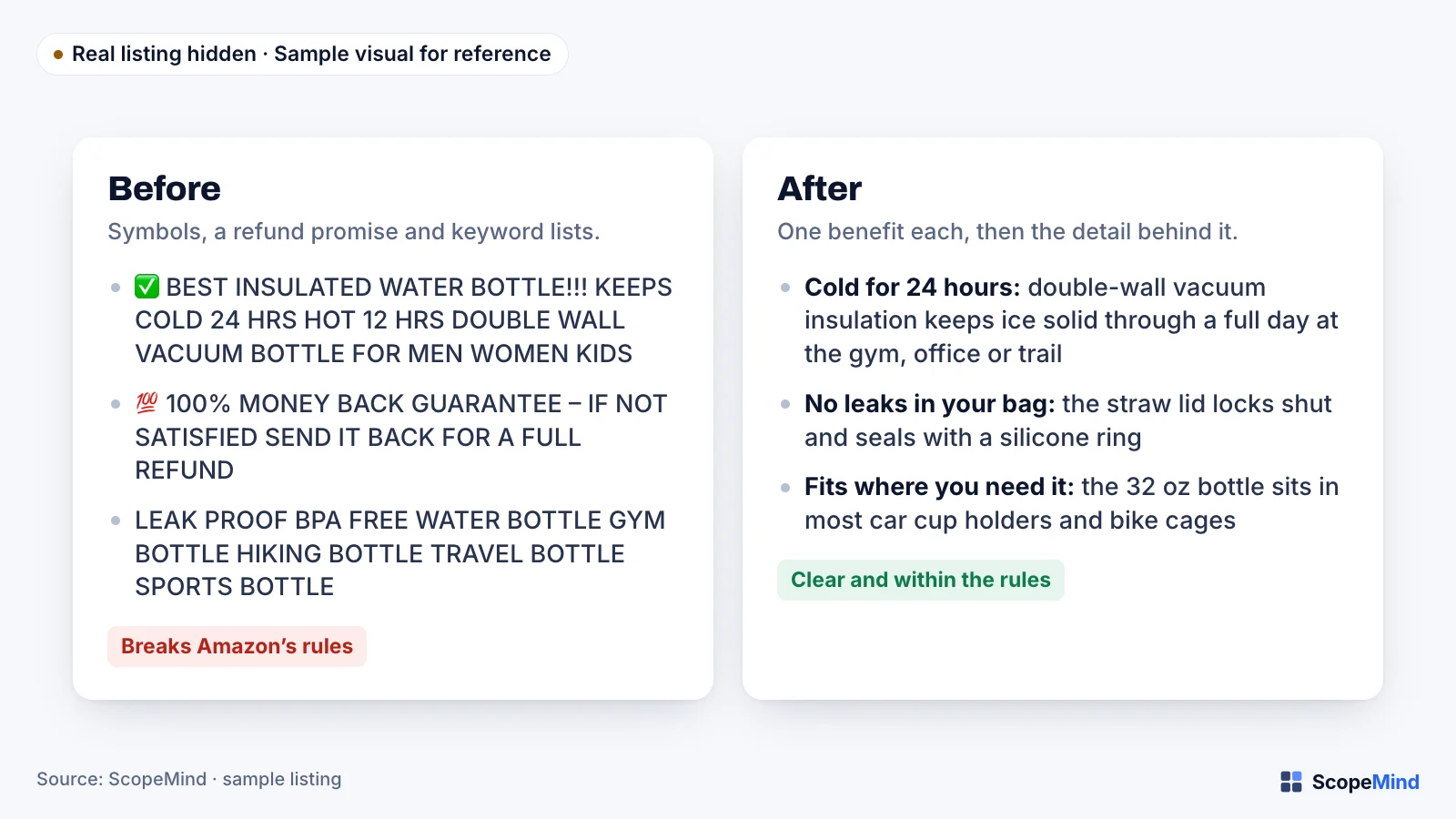
- Emojis and decorative symbols. No ticks, stars or arrows at the start of a bullet, and no trademark signs.
- Guarantee and refund wording. "Money back guarantee" and "full refund if not satisfied" do not belong in a bullet.
- Price, shipping and promotions. "Free shipping", "sale" and "best price" change over time and are not product features.
- Links, company information and contact details. No web addresses, email addresses or phone numbers.
- Placeholder text. "N/A", "TBD" or an empty bullet.
- Claims you cannot support. Environmental and health claims need evidence. Leave them out unless you can prove them.
- Keyword lists. A row of search terms is not a feature, and shoppers skip it.
How do you write a good Amazon bullet point?
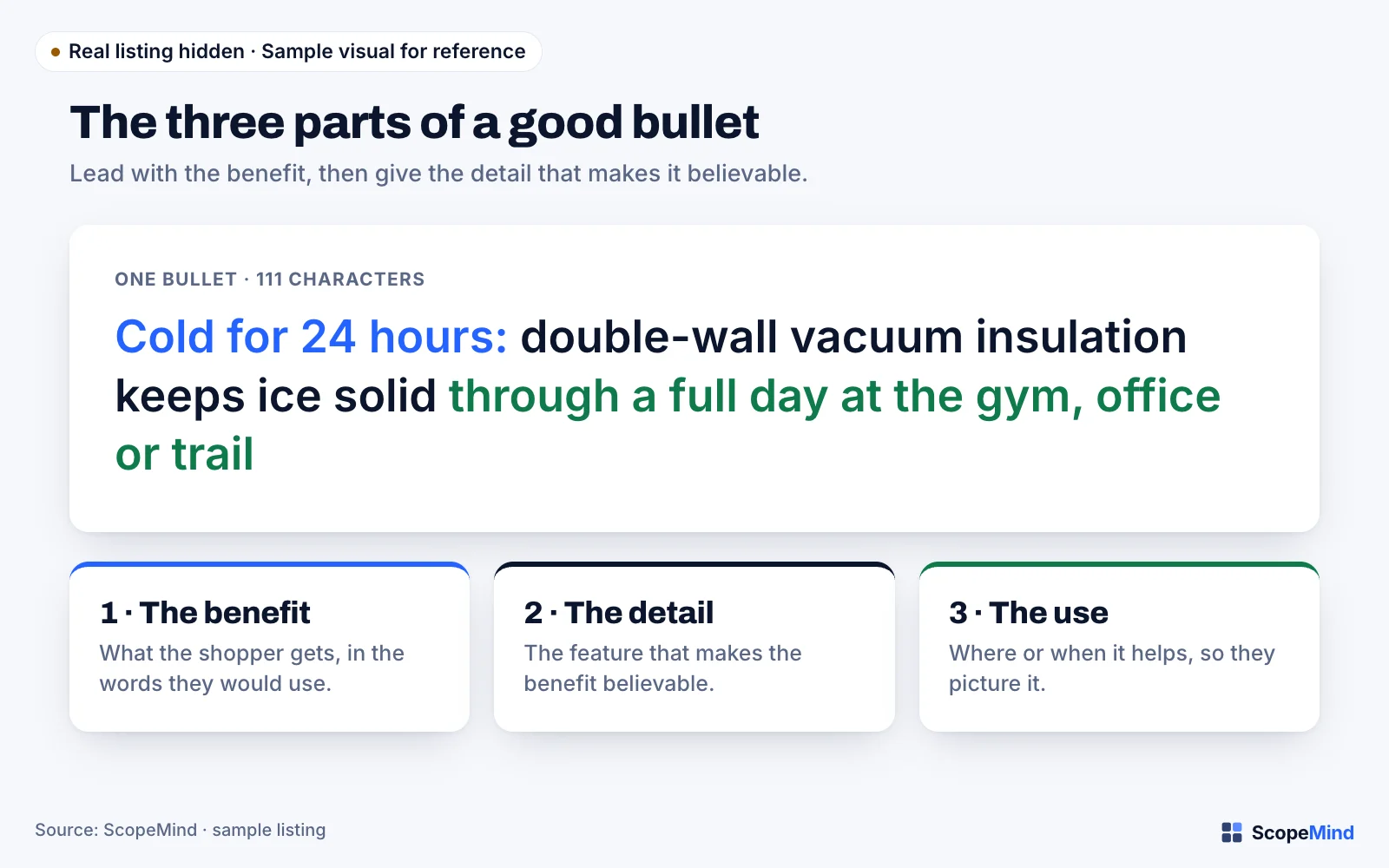
Lead with the benefit, follow with the detail that makes it believable, and end with where it helps.
- List what shoppers care about, in order. Read your reviews and your competitors' reviews. The things people praise or complain about most are your first bullets.
- Give each bullet one job. One feature or benefit per bullet. Two points in one bullet means neither gets read.
- Open with the benefit in a few words. "Cold for 24 hours" tells the shopper what they get. "Double-wall vacuum insulation" tells them how, and comes second.
- Add the detail that makes it believable. A material, a measurement or a number does more than an adjective.
- Put the strongest bullet first. The first two bullets are the ones most shoppers see.
- Use your main search words where they fit. Once is enough.
- Read them on a phone before you publish. If the benefit is not in the first line, move it forward.
Can you use bold, emojis or HTML in Amazon bullet points?
No. Bullets are plain text.
The field does not support bold, italics or HTML tags, and emojis are against the rules. The common way to make the start of a bullet stand out is a short benefit phrase followed by a colon, as in the samples on this page. Writing the opening phrase in capital letters is common too, but it is harder to read than normal sentence case.
What do a competitor's bullet changes tell you?
They show which benefit a competitor is now betting on, often before their images or title change.
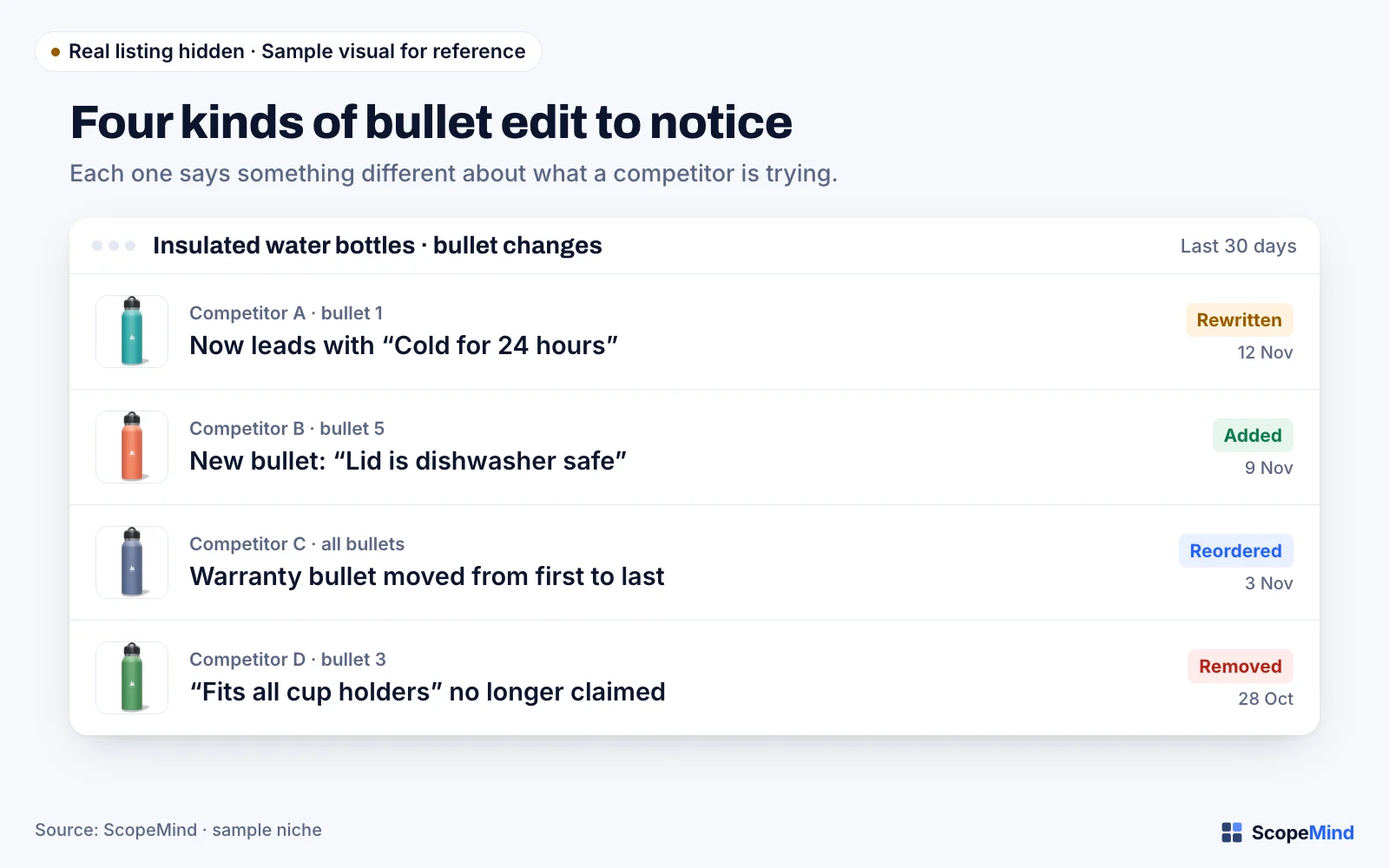
Bullets are cheap to edit, so sellers test ideas there first. A changed bullet is easy to miss by eye, because the page looks the same. Four kinds of edit are worth noticing.
| Bullet change | What it usually means | A sensible first move |
|---|---|---|
| First bullet rewritten | A new lead benefit, often taken from their reviews | Check whether your own listing answers the same point. |
| New bullet added | A feature they now think shoppers ask about | If your product has it too, say so. |
| Order changed | A test of which benefit should come first | Watch their rank for two to three weeks. |
| Claim removed | The claim caused complaints, returns or a rule problem | Check that your own version of the claim holds up. |
ScopeMind records the bullets of every listing you track each day and shows each change with the old and new text side by side, next to that product's rank and keyword positions. You see the edit on the day it happens, and what followed.
When you rewrite your own bullets, measure the result against what competitors did in the same weeks. A before and after on your own numbers alone will mislead you if a competitor cut their price at the same time.
Frequently asked questions
- How many bullet points can you have on Amazon?
- Most sellers get five bullet points per listing. Use all five, with one feature or benefit in each. Some categories and account types show a different number, so check the edit page for your own product.
- How long should Amazon bullet points be?
- Aim for 100 to 200 characters per bullet. Amazon's general guidance is between 10 and 255 characters, and some categories accept more. Shorter bullets are easier to read on a phone, where only the first lines show.
- Can you use emojis or bold text in Amazon bullet points?
- No. Emojis and decorative symbols are not allowed, and the bullet field does not support bold or other formatting. To make the start of a bullet stand out, begin with a short benefit phrase followed by a colon.
- Can Amazon change or remove my bullet points?
- Yes. Amazon can remove or rewrite bullets that break its rules, and it may do so without asking first. Check your listing after you publish, and again from time to time.
- Do bullet points help with Amazon search?
- Amazon reads the text of the whole listing, bullets included, to understand what a product is. Write each bullet for the shopper first and use your main search words where they fit naturally. Repeating a keyword adds nothing.
See which bullets your competitors rewrite
ScopeMind records every tracked listing daily and shows each bullet change, before and after, next to rank and keyword positions.
Start tracking listing changes