Amazon Brand Registry: what you need, and how to enroll
Amazon Brand Registry is Amazon's free program for brand owners. To enroll you need an active registered trademark, or a pending application, as a word mark or a design mark containing text. Amazon then verifies ownership through a public contact on the trademark record before your brand tools open.
Key takeaways
- A pending trademark application qualifies. You do not have to wait for the registration certificate.
- Brand Registry itself is free. The trademark behind it is not, and those are two separate bills.
- Amazon publishes no approval timeline. Verification is the step that decides the wait.
- Your brand name must match the trademark text. Amazon forgives capital letters, not added spaces or symbols.
- Enrolling does not freeze your listing. The copy, images and A+ modules on an enrolled page still change.
What is Amazon Brand Registry?
It is the record that ties your trademark to your brand name inside Amazon's catalog, and the set of tools that record opens.
Amazon describes it on its own eligibility page as "a free program" offering "a suite of brand-building tools and protection benefits". Both halves matter. The record is what lets Amazon treat you as the owner of a brand name, rather than one of several sellers using it.
That ownership is what makes the protection tools mean anything. The tools are the visible part, but the record is the thing you are applying for.
It is also why enrolling is not the same as typing your brand into a listing. A brand name in a listing field is just text. Brand Registry is a verified claim, checked against a government trademark office.
Do you need a trademark to enroll?
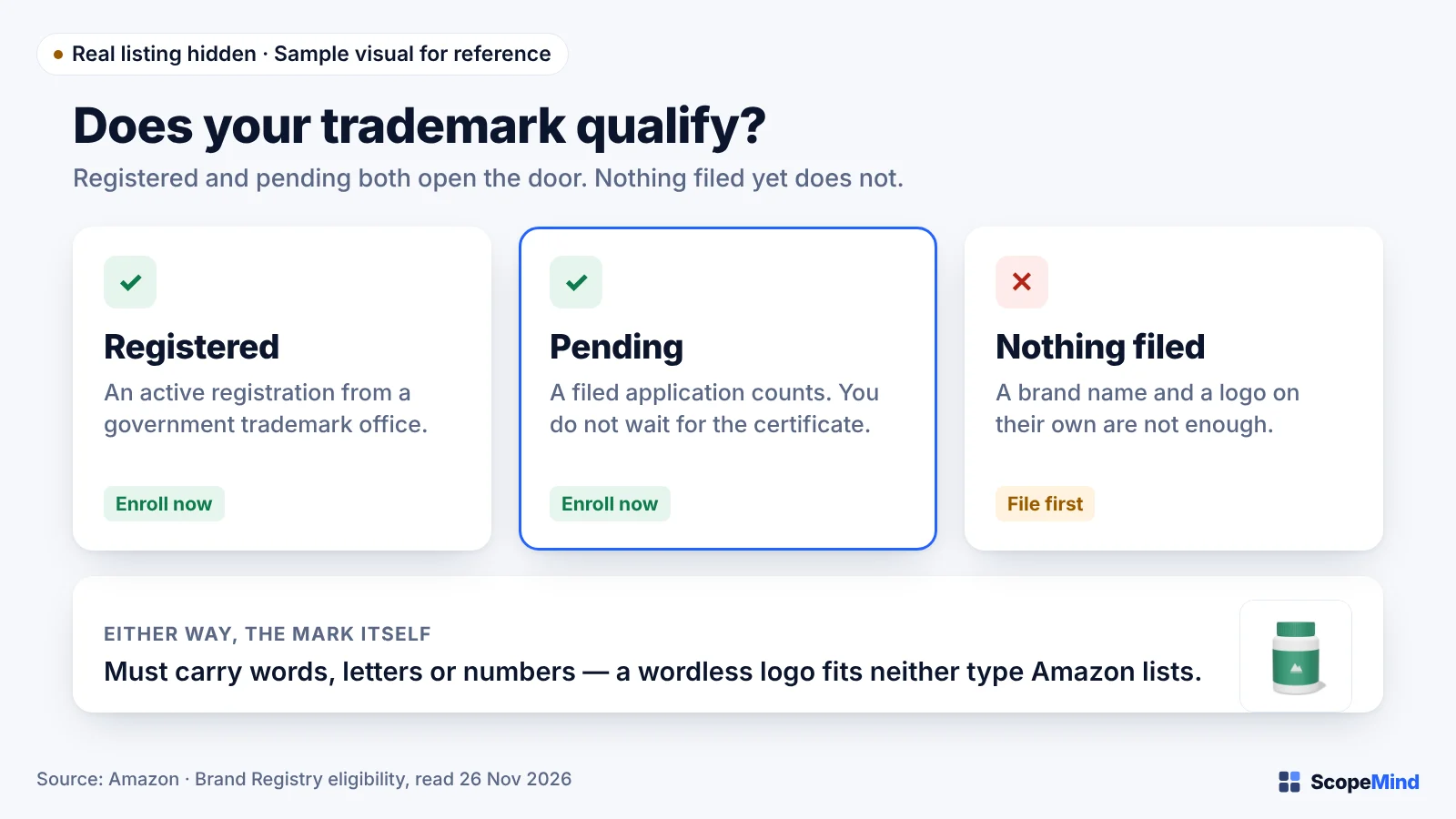
Yes, but it does not have to be registered yet.
Amazon's eligibility page asks for "an active registered trademark or a pending trademark registration". The mark has to be one of two kinds. Either a text-based mark, which Amazon calls a word mark, or an image-based mark containing words, letters or numbers, which Amazon calls a design mark.
It must come from what Amazon describes as the designated government trademark office of a country with a corresponding Amazon store.
Read that definition carefully if your logo is a symbol. A mark with no words, letters or numbers in it fits neither category Amazon lists. If your only filing is a purely graphic logo, that is the gap to close before you apply.
You also pick one country's trademark office when you enroll. Amazon says further offices can be added once the brand is approved, so the first application does not lock you into a single store.
Can you enroll without a trademark at all?
No. The earliest point of entry is a filed application, not an intention to file.
Amazon's own route for sellers who have not filed is IP Accelerator. It connects a seller with vetted legal service providers, rather than granting any protection on its own.
Amazon says participants "can access a broader range of brand protection benefits sooner, even if their trademark registration is still pending". It is explicit that the trigger is the filing: once the application is pending, the brand can be enrolled.
Two cautions Amazon states itself. IP Accelerator does not open everything, because each tool carries its own access requirements on top of enrollment. And Amazon charges nothing to make the introduction, so you work with and pay the provider directly.
What does Brand Registry cost?
The program is free. The trademark is not. Keep the two apart when you budget.
Amazon calls Brand Registry "a free program", and there is no enrollment fee. The cost sits in the trademark filing. Through IP Accelerator, Amazon publishes pre-negotiated ceilings for a single brand in a single class:
- A US trademark application at $700 plus government fees.
- A high-level brand search at $650.
- A comprehensive brand review at $1,800.
Amazon notes that other services and other trademark offices vary by provider, and that providers should respond within two business days.
Those are maximums for that one route, read from Amazon's IP Accelerator page in November 2026. They are not the market rate. Filing directly, or through your own attorney, is a different number.
How do you enroll, step by step?
Six steps, and the order matters, because the later ones are checked against the earlier ones.
- Create the Brand Registry account using the same credentials you use for Seller Central or Vendor Central. That is what links your selling account to the brand record. You can enroll without selling on Amazon at all, but then A+ Content and Stores are not available to you.
- Enter the brand name exactly as the trademark text reads. Not your trading name, and not the name on your packaging if the two differ. The trademark record is the authority.
- Enter the registration or application number in the exact format the issuing office uses. A number reformatted to look tidier is a number that does not match.
- Select the mark type to match the record. If the office registered a design mark, select design mark.
- Upload the images Amazon asks for: your logo on its own, and a photograph showing that logo permanently affixed to the product or its packaging.
- Complete the verification step. Amazon reaches out to a public contact associated with your trademark registration. That person receives a verification code, and you submit the code back to finish enrollment.
Amazon also says it may ask for manufacturing or distribution information to confirm you are the rights owner, so have that reachable before you start.
Settle one thing up front. Amazon states that the application must be submitted by the trademark owner: the individual, business or entity that legally owns the rights. If you are an agency or a distributor, the owner enrolls the brand and adds you afterwards as an authorized user.
Why do applications get rejected?
Almost always because something in the application disagrees with the trademark record or the product photo.
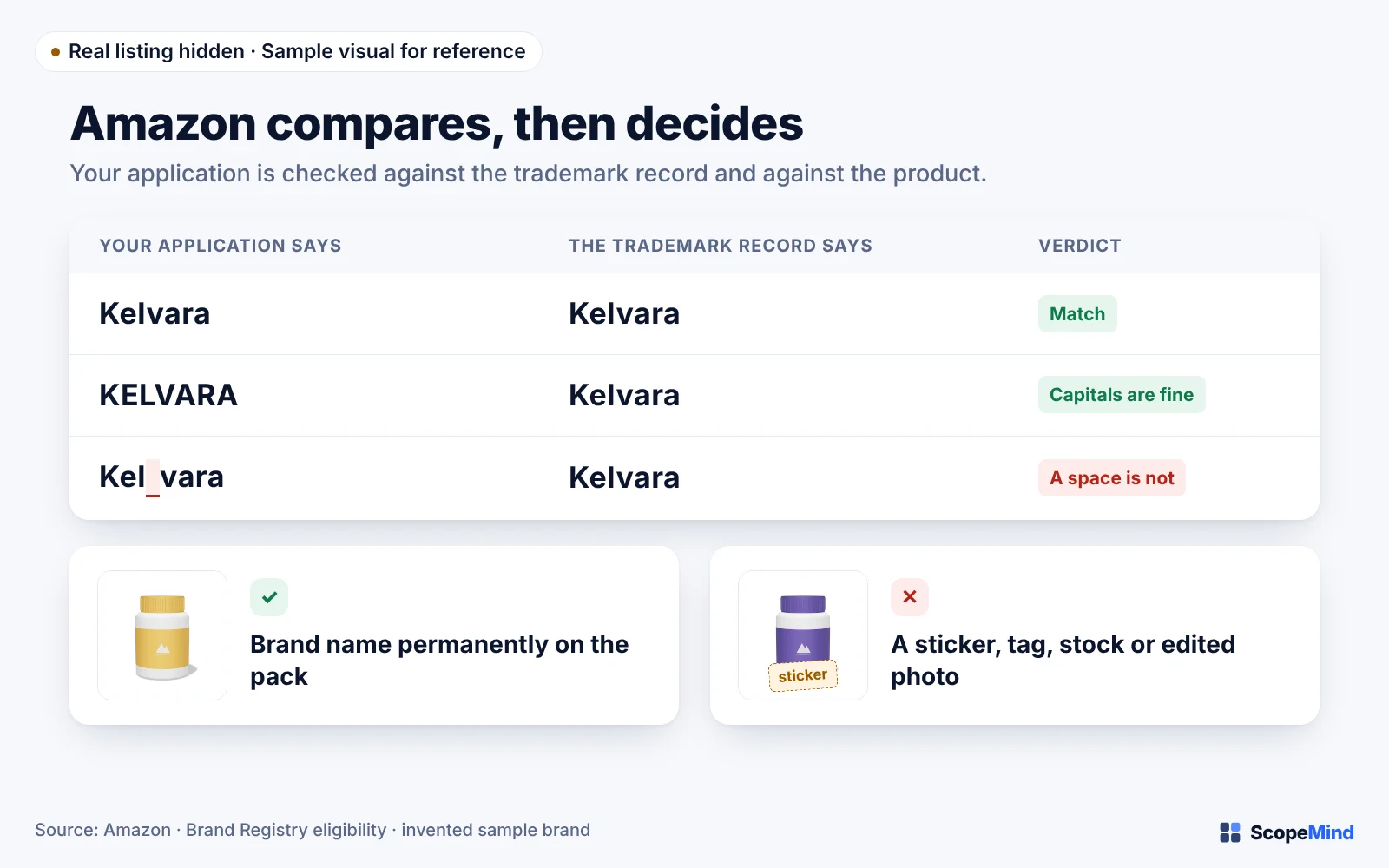
| What Amazon checks | The trap | What to do instead |
|---|---|---|
| Brand name against trademark text | Adding a space, a hyphen or a symbol the registration does not have | Copy the text straight off the registration. Capital letters are accepted, spaces and symbols are not |
| Mark type against the record | Selecting word mark when the office registered a design mark | Read the mark type off the registration and mirror it |
| Registration number format | Tidying the number, dropping a prefix or a leading zero | Use the exact format the issuing office prints |
| Logo on the product | A sticker, a hang tag or a label standing in for a permanent mark | Photograph the brand name as it is permanently applied to the product or packaging |
| Product photos | Stock photography, or an image edited to add the logo | Shoot the actual product you sell, unaltered |
| Logo image upload | Uploading the trademark certificate in the logo field | Upload the logo as an image. The certificate is not a logo |
The pattern across all six is the same. Amazon is comparing two documents and expecting them to agree. Before you open the application, put the trademark registration next to the product and check them against each other.
The photography rules are stricter than most sellers expect. Our guide to Amazon main image requirements covers what an unaltered product shot has to look like.
How long does Brand Registry take?
Amazon publishes no approval timeline, so treat any specific number of days you read elsewhere as someone's estimate.
What Amazon does document is the step that decides the wait: verification. Amazon contacts a public contact associated with your trademark registration. That person receives a verification code and has to pass it to you. Until the code comes back, the application sits where it is.
That makes one piece of preparation worth more than refreshing the portal. Look up your own trademark record before you apply, and check which contact is listed on it. For Amazon.com that record sits with the United States Patent and Trademark Office, whose public database is free to search.
It is common for the listed contact to be an attorney you used once, a law firm's general mailbox, or an address at a domain you no longer own. If that is your record, sort the contact out first.
How do you check your application status?
Status lives in the Brand Registry portal itself, not in the main Seller Central dashboard. You sign in with the same Seller Central or Vendor Central credentials you enrolled with, and the application shows its current state there.
Two things are worth knowing while you wait. A case that closes without an approval is not always re-openable, so read any message Amazon sends before replying to it. And if a reapplication returns an error about the trademark being under review, check what you selected about brand ownership on the original form rather than filing again.
What does enrolling actually give you?
Two groups of tools: the ones that defend the brand, and the ones that build it.
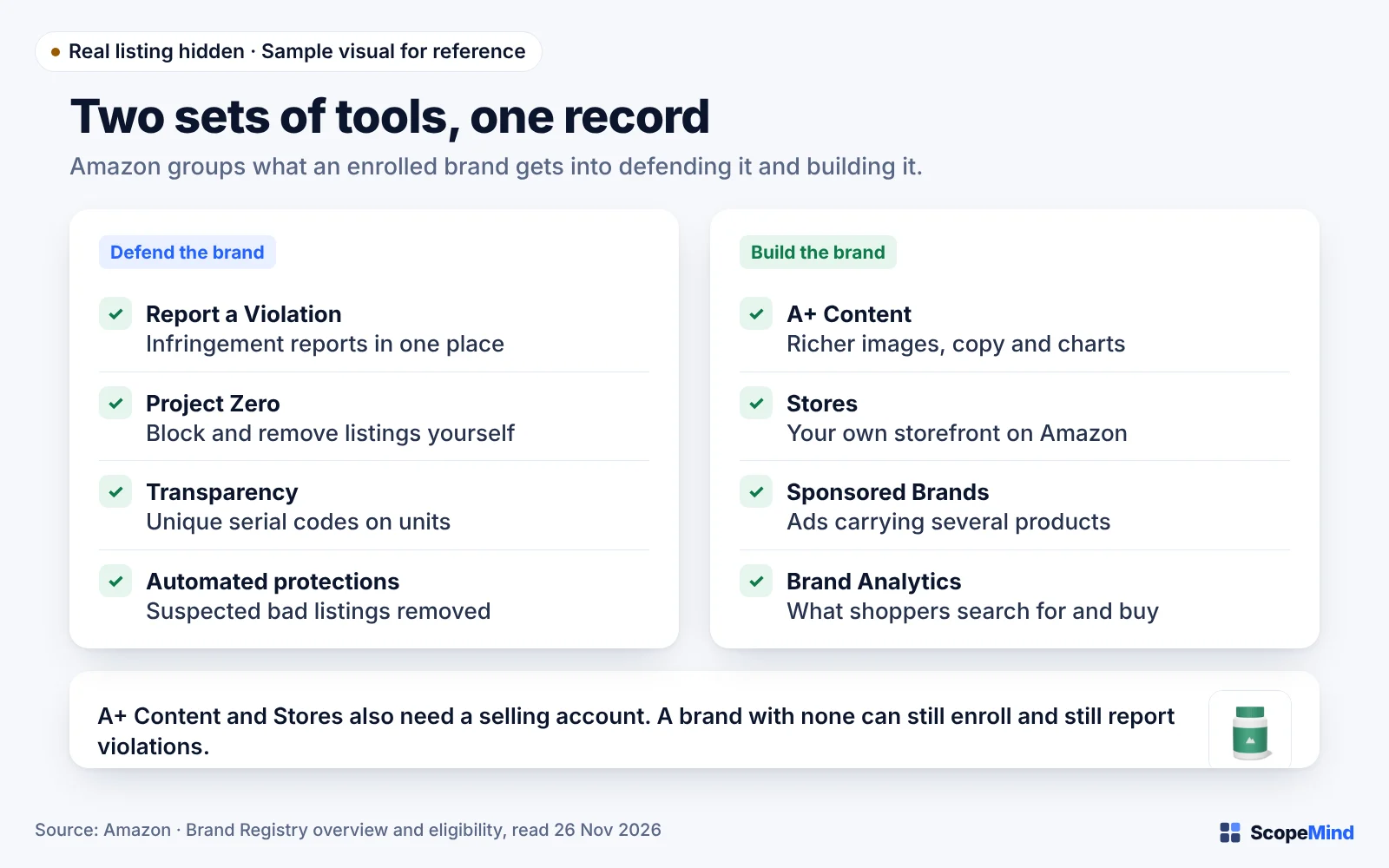
On the protection side, Amazon names Report a Violation for reporting suspected infringement, store policy violations and compliance concerns in one place. It names Project Zero, which it describes as the ability to block and remove listings immediately. It names Transparency, which puts unique serial codes on units. And it names automated protections, where Amazon says it uses the brand information you provide to find and remove suspected bad listings before shoppers see them.
On the brand-building side, Amazon lists A+ Content, Stores, Sponsored Brands, Brand Analytics, Manage Your Experiments and Amazon Vine, among others. If A+ Content is the reason you are enrolling, our guide to A+ content examples and requirements shows what those modules look like in practice.
Two limits are worth reading carefully. A+ Content and Stores need a selling account as well as an enrolled brand. And a brand with no selling account can still enroll and still use Report a Violation, which matters if you are registering a brand before you start selling.
Enrollment is the gate rather than the whole key. Amazon is clear that individual tools carry their own eligibility requirements on top of Brand Registry.
What Brand Registry does not do
It does not freeze your detail page.
Amazon's own claim is narrower than sellers tend to read it. Amazon says Brand Registry "can help increase the accuracy of product listings", and that it adds protections around your brand's product information. Helping accuracy is not the same as locking the page.
Three kinds of change still land on an enrolled listing. None of the three is an Amazon brand-page claim, so take them from the people watching listings rather than from the eligibility text.
The first is Amazon's own formatting. Amazon trims and rewrites titles that break its length and formatting rules, which we covered in our guide to the 75-character title limit. An enrolled brand does not exempt a title from that.
The second is other contributors. Detail-page attributes can be edited by others who sell or supply the same product, which is exactly the inaccuracy Brand Registry is meant to help you report.
The third is A+ content. Module and comparison-chart order shifts on its own, which is why most reported A+ "changes" turn out to be reordering rather than new copy. Our post on A+ content goes through how to tell the two apart.
None of the three sends you an email.
So enrollment is where watching your listing starts, not where it stops. The useful habit is knowing what your page said yesterday. Then a trimmed bullet or a dropped size variant reaches you from your own records, not from a conversion dip three weeks later. That is the job ScopeMind does: it snapshots your listings daily and flags the title, bullet, image and A+ changes you did not make, next to what competitors in the same niche changed.
Frequently asked questions
- Do I need a registered trademark for Amazon Brand Registry?
- You need either a registered trademark or a pending trademark registration. The mark must be a text-based word mark, or a design mark that contains words, letters or numbers, from a designated government trademark office.
- Can I enroll in Brand Registry with a pending trademark?
- Yes. Amazon accepts a pending trademark registration, and its IP Accelerator program is built around enrolling once an application is pending. Amazon notes that this does not open every tool, since each one has its own access requirements.
- Does Amazon Brand Registry cost anything?
- Amazon calls Brand Registry a free program and charges no enrollment fee. The cost is the trademark itself. Through IP Accelerator, Amazon publishes ceiling prices such as $700 plus government fees for a US application, paid to the provider rather than to Amazon.
- How long does Brand Registry approval take?
- Amazon does not publish an approval timeline. The step that decides the wait is verification: Amazon sends a code to a public contact on your trademark registration, and enrollment finishes only once you submit that code back.
- Can I enroll a brand if I do not sell on Amazon?
- Yes. Amazon says you can enroll even if you do not sell with Amazon. You will not have access to A+ Content or Stores, which need a selling account, but Report a Violation is available.
- Does Brand Registry stop other sellers changing my listing?
- Not entirely. Brand Registry adds protections and helps listing accuracy. Titles can still be rewritten to fit Amazon's formatting rules, other contributors can still edit detail-page fields, and A+ modules can be reordered. Watching your own page is still worth doing.
Enrolled? Now watch what the page actually says
ScopeMind records your listings every day and flags the title, bullet, image and A+ changes you did not make.
Start watching your listings