Amazon's 75-character title limit: what changed and how to rewrite your title
Amazon's title character limit is 75 characters, spaces included, in every category except media such as books, music and video. It has applied since 27 July 2026. Benefits and uses now belong in a separate field, Item Highlights, which holds up to 125 characters. A title left over the limit can be shortened by Amazon automatically.
Key takeaways
- The title now has one job: say what the product is. Brand, product type, size, material and variant fit in 75 characters.
- Benefits and uses move to Item Highlights, a field of up to 125 characters under the title.
- Rewrite the title yourself. If you leave it too long, Amazon can shorten it, and it may not keep the words you would have chosen.
- The older rules still apply: no promotional phrases, no decorative symbols, and no word repeated more than twice.
- After the rewrite, watch your keyword positions for two weeks and compare with what competitors changed in the same period.
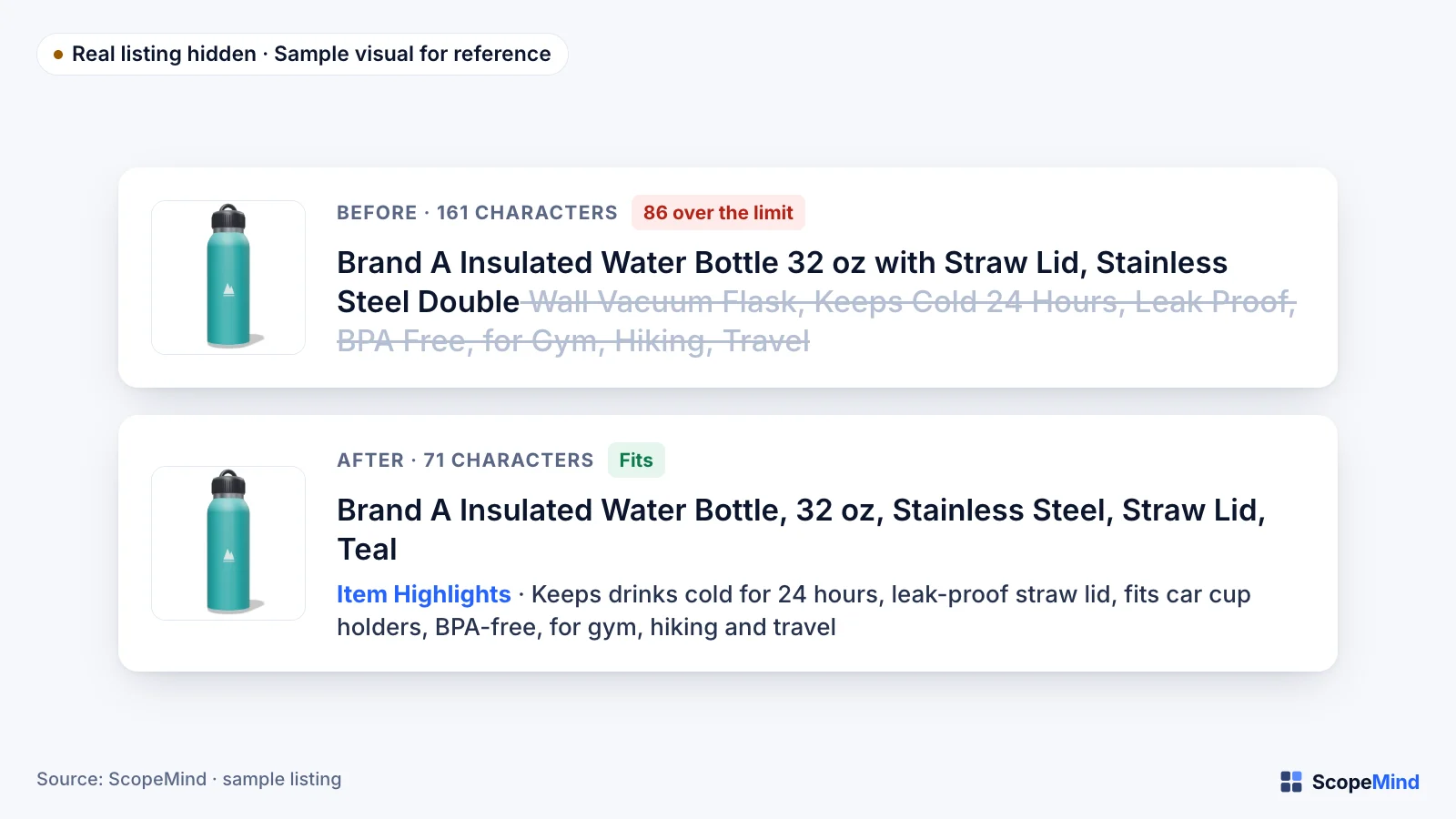
What is the Amazon title character limit in 2026?
The limit is 75 characters including spaces, in every category except media, and it has applied since 27 July 2026.
Amazon announced the change to sellers in June 2026. Before it, most categories allowed up to 200 characters, and many sellers used the space for keywords, benefits and uses. The new rule shortens the title to what a shopper can read at a glance on a phone, and gives the rest its own field.
| Rule | Before 27 July 2026 | Now |
|---|---|---|
| Maximum title length | 200 characters in most categories | 75 characters |
| Do spaces count? | Yes | Yes |
| Where benefits and uses go | Often in the title | Item Highlights, up to 125 characters |
| Categories covered | Most | All except media (books, music, video) |
| A title over the limit | Flagged for the seller to fix | Can be shortened by Amazon automatically |
Category rules can differ in the details. Before you edit, read Amazon's own product title requirements in Seller Central for your category.
What is Item Highlights, and what goes there?
Item Highlights is a field of up to 125 characters, shown under the title, for the main benefits and uses of the product.
Think of the three fields as three jobs. The title says what the product is. Item Highlights says why someone would buy it. The bullet points give the detail and the proof behind each benefit.
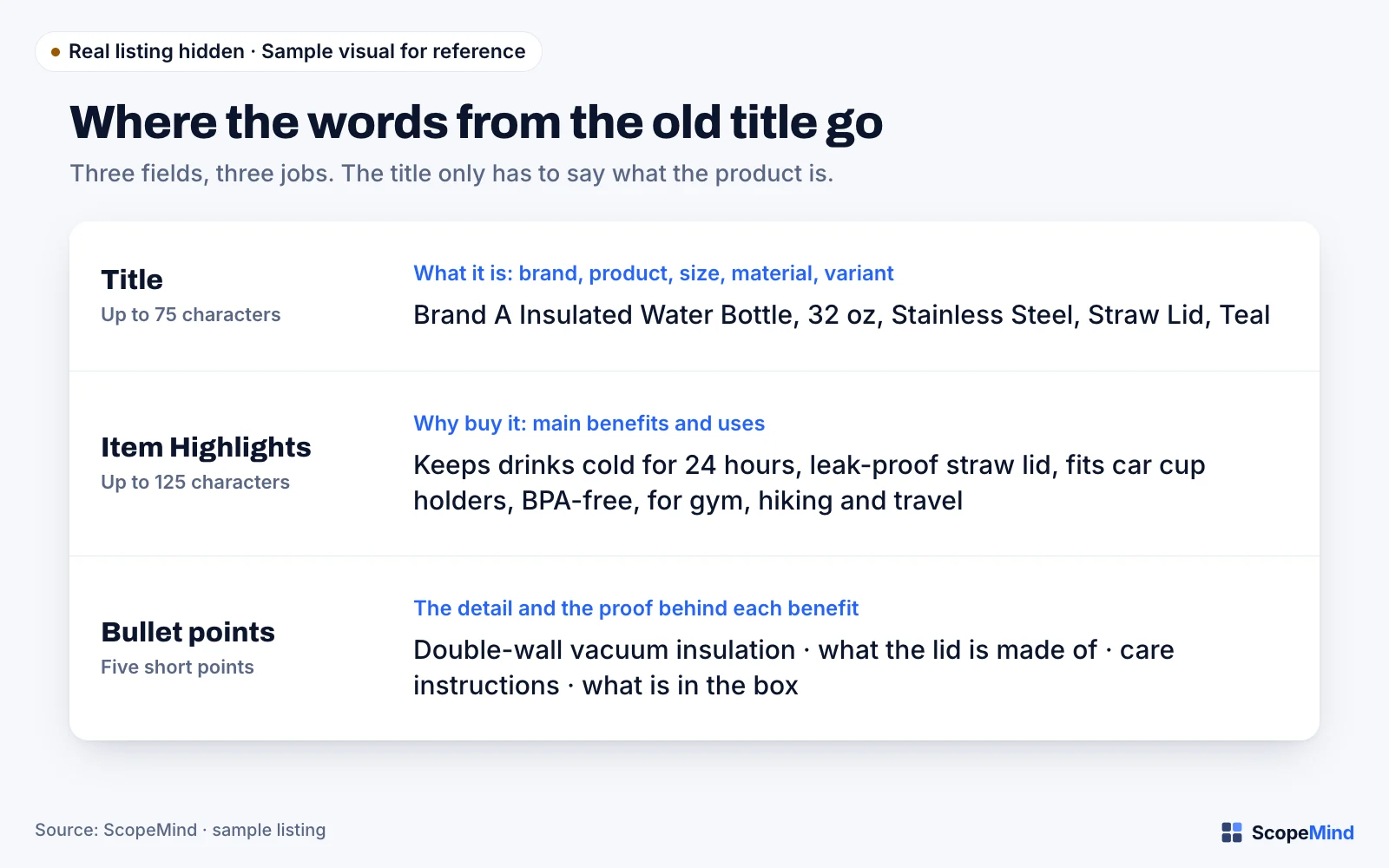
Write Item Highlights as short phrases separated by commas, with the most important benefit first. Do not repeat the title in it. The space is small, and a repeated word is a wasted one.
What happens if your title is longer than 75 characters?
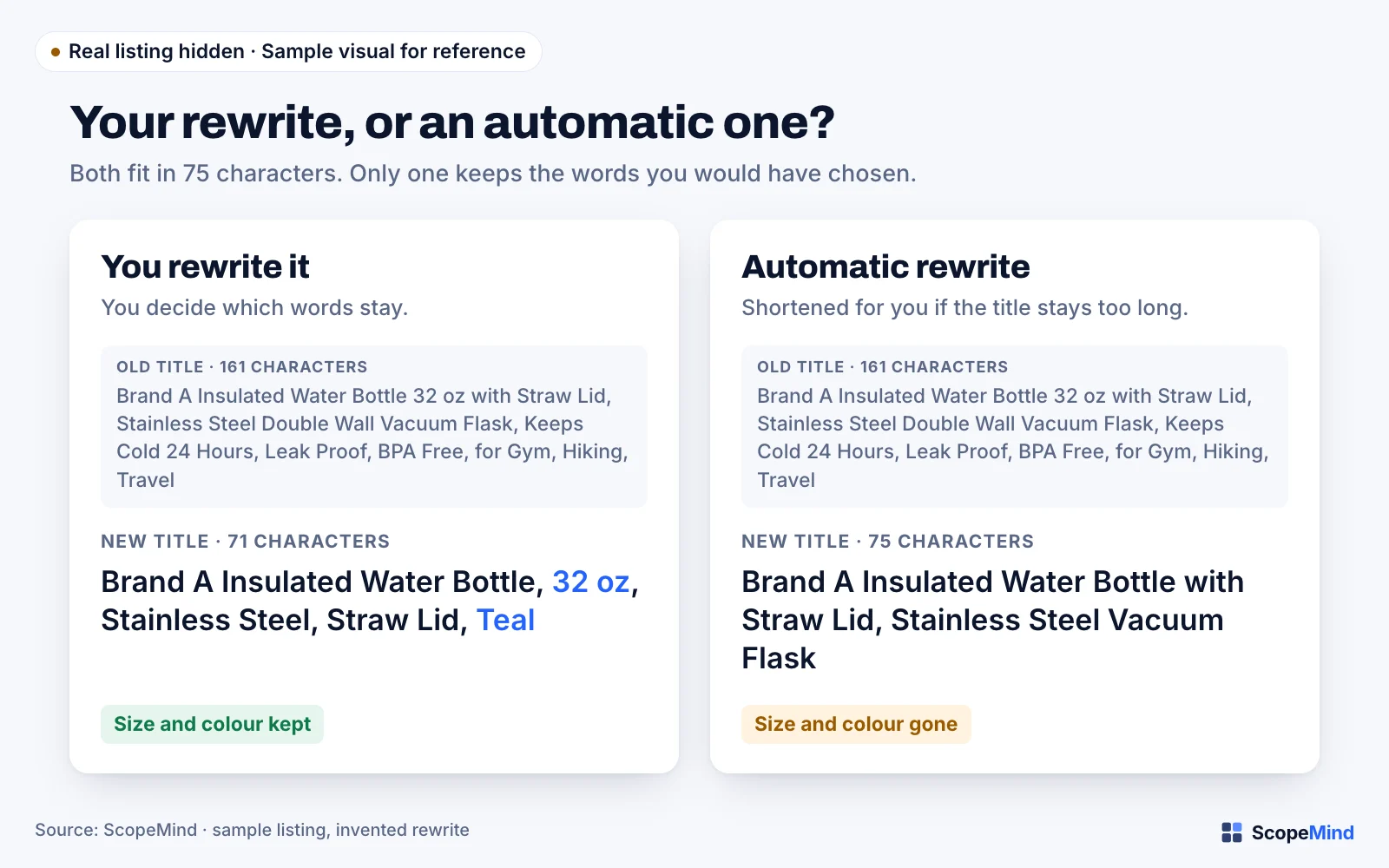
Amazon can replace it with a shorter title of its own.
Amazon has said it shortens over-length titles automatically and does so gradually, not all on one day. So a long title that is still live today is not a sign that the listing is exempt. Watch your Seller Central notifications, because that is where a rewritten title is announced.
The risk is not the shorter title. It is losing the choice of words. An automatic rewrite has to guess what matters, and it can drop the size, the colour or the pack count that a shopper needs to pick the right variant.
How do you rewrite an Amazon title to fit 75 characters?
Keep what identifies the product, move the benefits to Item Highlights, and cut the rest.
- Start with the brand and the product type. "Brand A Insulated Water Bottle" tells a shopper and Amazon what this is.
- Add what separates this variant from its siblings. Size, colour, pack count or material. These are the words a shopper uses to pick the right one.
- Keep the one search phrase that matters most. Usually it is already there, as the product type. Do not try to fit three versions of it.
- Move benefits and uses to Item Highlights. "Keeps cold 24 hours" and "for gym, hiking, travel" belong there now.
- Cut filler. Words such as "premium" and "high quality", repeated words, and anything that a shopper would not miss.
- Count the characters, spaces included, and leave a few spare so a later edit does not push it over.
- Read it on a phone. If the first 40 characters do not say what the product is, change the order.
In the sample at the top of this page, the 161-character title became "Brand A Insulated Water Bottle, 32 oz, Stainless Steel, Straw Lid, Teal": 71 characters. Nothing was lost. The benefits moved one line down.
How do you check your title's character count?
Count every character including spaces; a spreadsheet does it in one formula.
Paste your titles into a column and use =LEN(A2) next to each one. Sort by the result, and every title above 75 is on your list. For a single title, the edit page in Seller Central shows the length as you type.
If you sell in several marketplaces, check each one. A translated title is often longer than the English one, and the limit is the same.
Which other title rules still apply?
The rules Amazon introduced in January 2025 are still in force alongside the new length.
- No decorative symbols. Characters such as ! $ ? _ { } ^ are not allowed unless they are part of the brand name.
- No word more than twice. Small words such as "and", "for" and "with" are excepted.
- No promotional phrases. "Best seller", "free shipping" and similar claims do not belong in a title.
- What the product is, not who sells it. Seller names and contact details stay out.
What can you learn from how competitors rewrote their titles?
The words a competitor kept in 75 characters are the words they believe sell the product.
A forced rewrite is a rare moment when every seller in a niche has to choose. Look at which search phrase each competitor kept, what they moved to Item Highlights, and whether their title still names the size or pack. If several of them lead with the same phrase and you do not, check your own position on it.
ScopeMind records the title and Item Highlights of every listing you track each day, and shows each change with the old and new text side by side, next to that product's rank and keyword positions. That makes it easy to see who rewrote their own title, and what happened after.
When you change your own title, measure the result against what competitors did in the same weeks. A before and after on your own numbers alone will mislead you if a competitor ran a coupon at the same time.
Frequently asked questions
- Does the 75-character title limit include spaces?
- Yes. Spaces, commas and hyphens all count. A quick way to check is to paste the title into a spreadsheet cell and use the LEN formula, which counts spaces too.
- Which categories are exempt from the 75-character title limit?
- Media products: books, music, video and similar items, where the title is the name of the work. Every other category is covered. Check the title rules for your own category in Seller Central before you edit.
- Will a shorter title hurt my ranking?
- Not by itself. The words you remove from the title can go into Item Highlights and the bullet points, which Amazon also reads. Watch your keyword positions for two weeks after the change, so you see any drop early.
- Can I still use 200 characters in an Amazon title?
- No. The older 200-character maximum applied to most categories until 27 July 2026. Since then the maximum is 75 characters, and titles above it can be shortened automatically.
- What is the character limit for Item Highlights?
- Item Highlights holds up to 125 characters. It sits under the title and is the place for the main benefits and uses that no longer fit in the title.
See how your competitors rewrote their titles
ScopeMind records every tracked listing daily and shows each title change, before and after, next to rank and keyword positions.
Start tracking listing changes