Barcodes for Amazon products: which one goes on your box?
Amazon products use two different barcodes for two different jobs. A GTIN, usually a UPC, identifies the product in Amazon's catalog and decides which listing your offer joins. An Amazon barcode, whose number is the FNSKU, identifies your unit inside a fulfillment center. Which one goes on the box depends on your product's category.
Key takeaways
- Two codes, two jobs. A GTIN gets your product into Amazon's catalog. An Amazon barcode, numbered with an FNSKU, tracks your unit in the warehouse.
- The manufacturer's own code, meaning a UPC, EAN, JAN or ISBN, is the default. Amazon tracks your FBA stock with it until you change your barcode setting.
- Amazon wants its own code on some products. Used items, media, restricted or dangerous goods, consumables and topicals all qualify, as does anything whose own code will not scan.
- A brand enrolled in Brand Registry may be able to apply for an exemption and keep using the manufacturer's code.
- The label spec is exact, down to the ink and the paper, and Amazon turns away damaged or photocopied labels.
What barcodes does an Amazon product actually need?
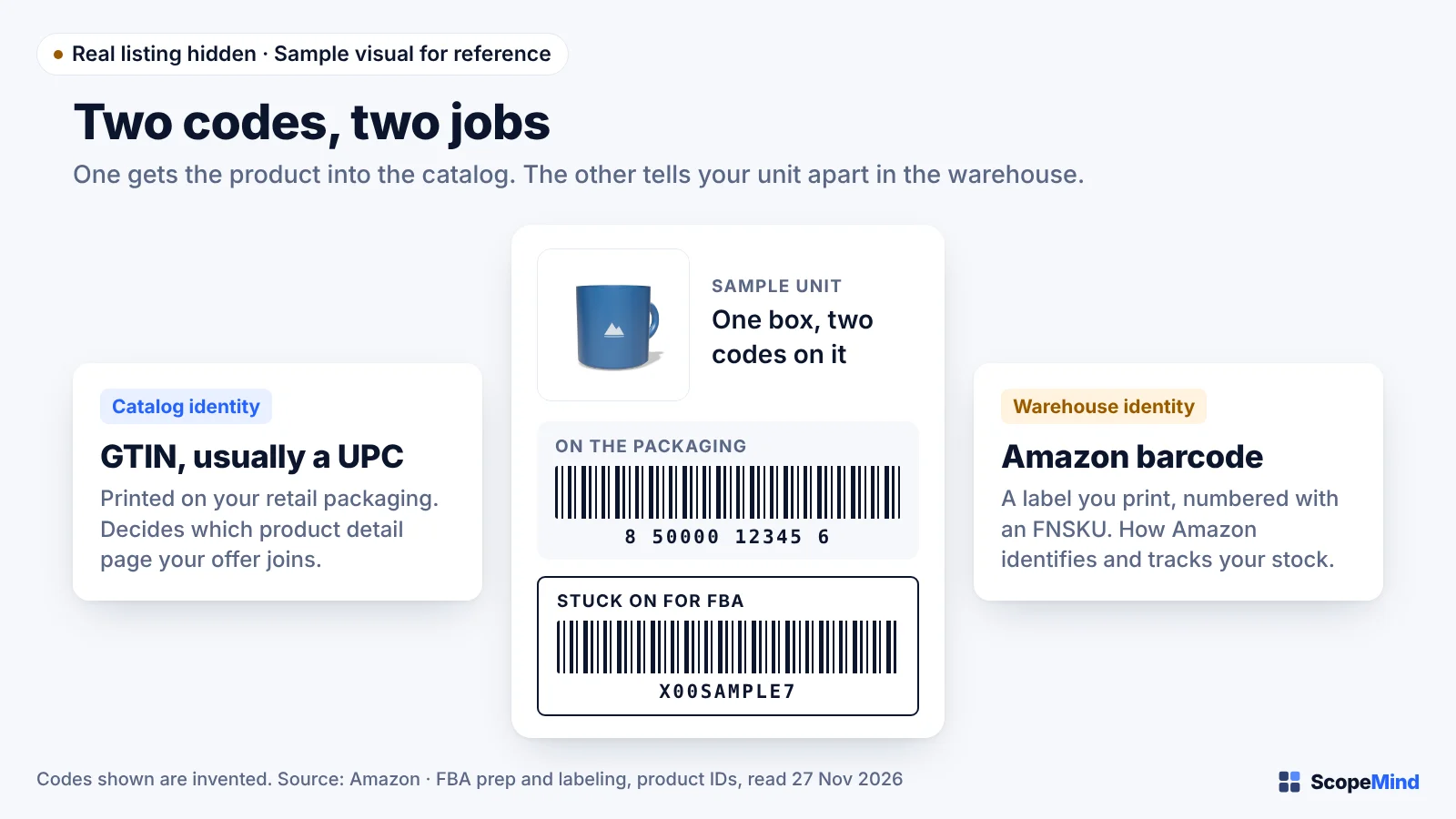
Two, and they do different jobs: one gets your product into the catalog, the other tells your unit apart from another seller's.
A barcode's job is to turn a product into a number a machine can read. You may never see yours scanned at a till if you only sell online. Amazon still needs one number to tell your product apart in its catalog, and another to tell your unit apart in a warehouse. Every product in Amazon's warehouses carries a scannable code, which is how stock is identified and tracked as it moves.
So a GTIN answers "which product is this?" anywhere in retail. An Amazon barcode answers "whose unit is this?" inside a fulfillment center. You need a GTIN before you can create or join a listing, and it is not something you print. You need an Amazon barcode only for FBA, and only for some products.
| GTIN, usually a UPC | Amazon barcode, numbered FNSKU | |
|---|---|---|
| What it identifies | The product, at any retailer | Your unit, in Amazon's warehouse |
| Who provides it | GS1, or your manufacturer | Amazon |
| What it is used for | Matching or creating a product detail page | Identifying and tracking stock in fulfillment |
| Where it sits | On your retail packaging | On a label you print and apply |
| When you need it | To create or match a listing | To send some products to FBA |
A SKU is a third thing, and not a barcode at all. It is your own internal code for your own stock, so two companies can use different SKUs for the same product.
What is a GTIN, and where do you get one?
A GTIN is a product ID: a number of up to 14 digits, unique worldwide, that usually sits printed under the barcode on your packaging.
GTIN is short for Global Trade Item Number, and Amazon counts it as a product ID. Four types cover almost everything sellers list, and they are the ones Amazon names for creating product detail pages. UPC is the standard identifier, EAN is for the European marketplace, JAN for the Japanese marketplace, and ISBN for books.
Amazon names two ways to get one. Sourcing the product from a manufacturer? Ask them for the GTIN. Made it yourself? You get one from an organization called GS1.
Amazon's guide says nothing about codes bought from resellers, and quotes no GS1 prices, so this post quotes neither. GS1 is the route Amazon names for a product you own. If cheap codes have been offered to you elsewhere, check the requirement for your own category in Seller Central first.
No product ID at all? Amazon says to look first for your product already being sold in its store. If it is not there, you may be eligible for a GTIN exemption, which lets you list without a product ID. The application wants a product name or title, plus photos of the product and its packaging from every side.
A GTIN is not an ASIN. An ASIN is the 10-character code Amazon gives a product in its own catalog, created and assigned as the product gets listed. It is no use for identifying anything outside Amazon, while a GTIN works at any retailer. We cover what an ASIN is separately.
What is an FNSKU, and when does Amazon require one?
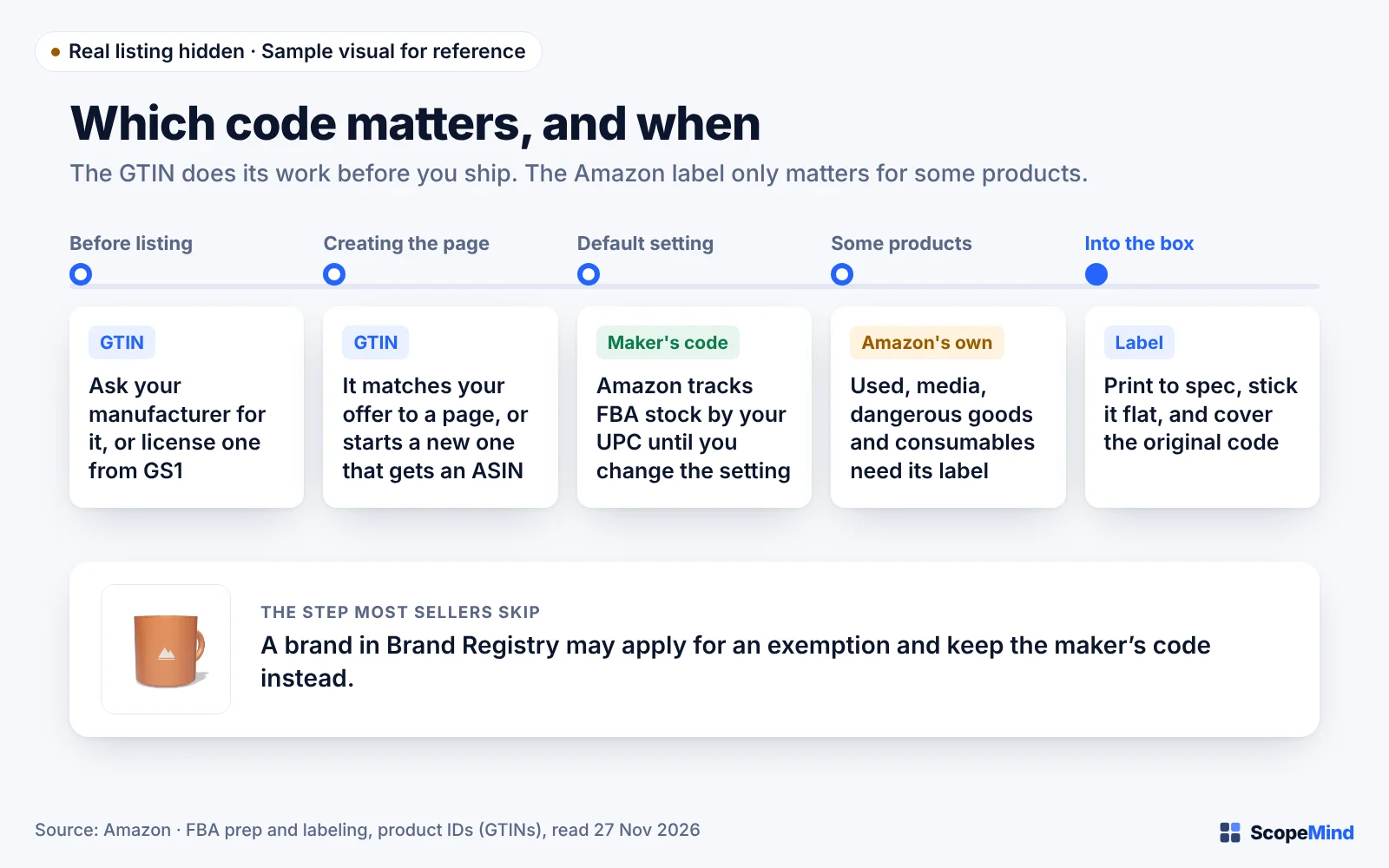
The FNSKU is the number carried on an Amazon barcode, and Amazon wants one on products it will not track by the manufacturer's code.
Start from the default, because most sellers never move off it. The manufacturer's code is the default option, and it can be a UPC, EAN, JAN or ISBN. Amazon tracks your inventory with that code until you change your barcode setting.
Amazon asks for its own code instead on products that:
- are not tracked by a manufacturer's code
- arrive in used condition
- carry no manufacturer's code that will scan
- are media products
- are restricted or dangerous goods
- are consumables or topicals, baby items among them
Two rules sit on top of that list. A seller who is not brand-registered has to label those products with Amazon's code. If your brand is enrolled in Amazon Brand Registry, you may be eligible to apply for an exemption instead, and keep the manufacturer's code. Our guide to enrolling in Amazon Brand Registry covers what that takes.
Transparency codes are separate again. Nothing may hide a Transparency code, and it may not hide another label either.
Amazon's beginner guide never says where the barcode setting lives. Find it in your own Seller Central account rather than copying a menu path out of a blog post, this one included.
How do you label a unit for FBA?
Print to Amazon's spec, stick it on a flat surface, and leave no second barcode a scanner could read by mistake.
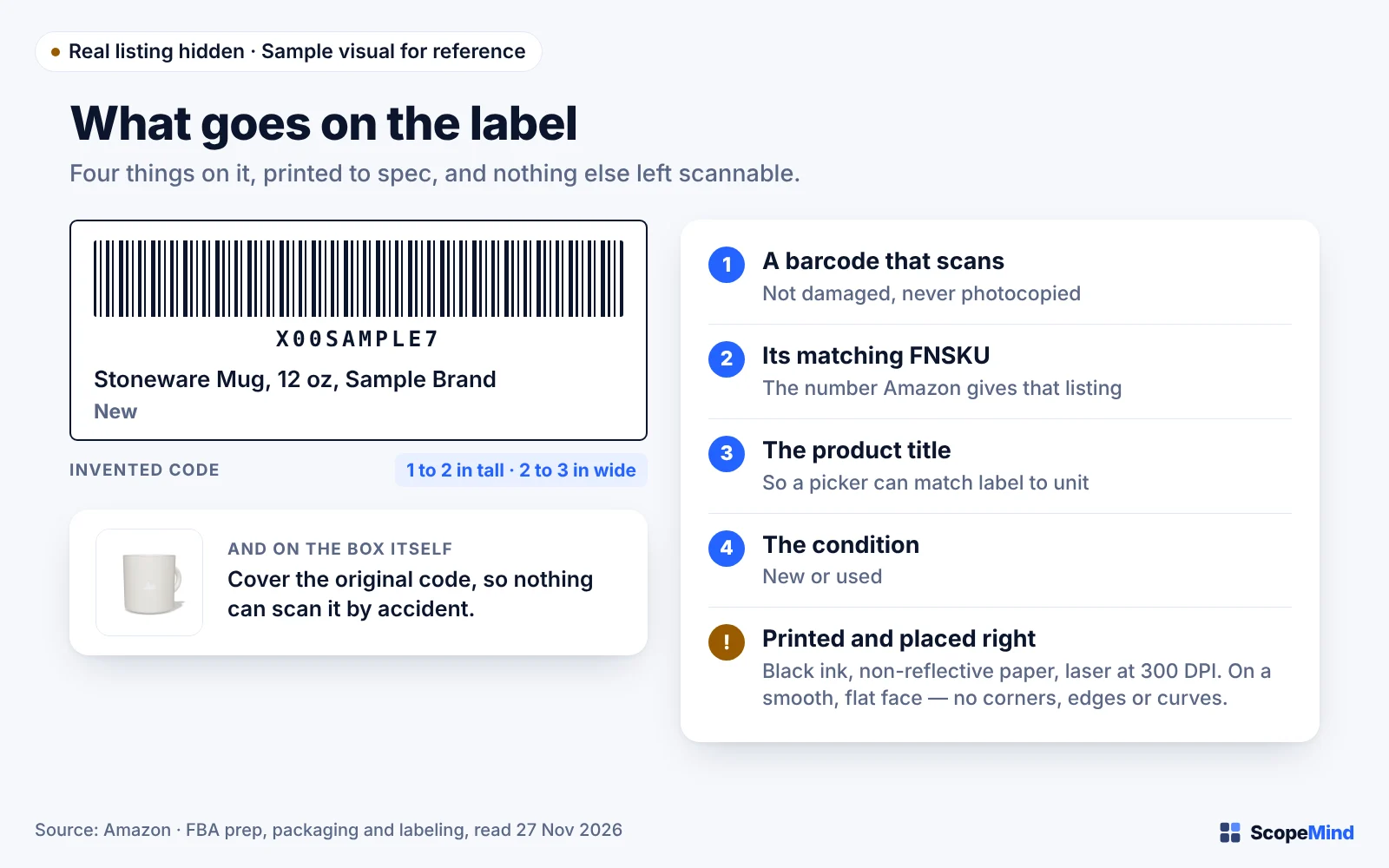
- Four things go on the label. A barcode that scans, its matching FNSKU number, the product title, and the condition, new or used.
- Print it to spec. Keep it 1 to 2 inches tall and 2 to 3 inches wide. Use black ink on non-reflective paper with an adhesive back. Amazon suggests a laser printer at 300 DPI.
- Never photocopy one. Damaged and photocopied labels are turned away.
- Find a smooth, flat face. Corners, edges and curved surfaces are out.
- Hide the old code, or label the outside. Where the product needs no extra packaging, cover its original UPC, EAN or ISBN so nothing can scan it by accident. Where the item is bagged or bubble-wrapped, the label goes on the outside, still readable.
- Clear the cartons too. Old codes on the outside of the boxes you ship have to go. Peel them off, tape over them, or black them out with a marker.
This part costs money when it goes wrong, not just time. Amazon can turn away, send back or repack a shipment whose packaging does not comply, and bill you for it.
What goes wrong with Amazon barcodes?
Three things: mixing up which code does which job, letting the wrong GTIN drop your offer onto the wrong listing, and planning around numbers Amazon never published.
Treating the GTIN as the label. The UPC on your packaging is catalog identity. It does not stand in for a printed Amazon barcode on a product that needs one. Once that label is on, the UPC underneath has to be covered. Miss this and a box ships with two codes a scanner can read.
Landing on a listing you do not control. A GTIN either matches your offer to a listing already in the Amazon store, or creates a new one. This is where the consequences reach past the warehouse. Match to the wrong page and your unit sells under someone else's title, images and A+ content, on a page other sellers can edit. Their changes then move your conversion, and your sales report is where you notice.
That is the argument for watching a shared listing, not only your own, and for knowing who else is on it when you compete for the featured offer on a shared listing. ScopeMind records every change on the pages you track: title, images, bullets, A+ content, price and the number of sellers, all on one timeline. An edit another seller makes on your page reaches you the same week.
Planning around figures Amazon never published. Pages ranking for this topic quote a per-label fee, a per-unit charge for unlabelled stock, and a firm line on resold barcode numbers. None of it is on Amazon's own barcode and labeling guides, which also say nothing about stickerless or commingled inventory. Treat those as other people's reporting. Check your own fee preview and barcode settings in Seller Central before you budget around them.
Frequently asked questions
- Do I need a barcode to sell on Amazon?
- You need a product ID to create or match a listing, and a GTIN such as a UPC is the usual one. Where a product has no product ID, Amazon says to check whether it is already sold in the store, and otherwise you may be eligible for a GTIN exemption.
- What barcode does Amazon use?
- The manufacturer's, by default: a UPC, EAN, JAN or ISBN. Amazon tracks your FBA inventory with that code until you change your barcode setting, or unless the product needs Amazon's own.
- How do I get my Amazon barcode?
- You print the labels yourself in the FBA shipment flow in Seller Central, generating a label file for your pages. Each label carries a barcode that scans, its matching FNSKU number, the product title and the condition.
- Is an ASIN a barcode?
- No. An ASIN is a 10-character code identifying a product inside Amazon's catalog, created and assigned as the product gets listed. It is not scannable packaging, and it identifies nothing at another retailer.
- Do I need a separate barcode for every size and color?
- Amazon publishes no flat rule. It says how many GTINs you need depends on how many products you have and the variations you offer. It also says a GTIN's last digit relates to packaging, such as one unit or a bulk shipment.
- Can I leave the UPC on the box when I add an FNSKU label?
- No. Where the product needs no extra packaging, Amazon says to cover any original UPC, EAN or ISBN so nothing scans it by accident. Where the item is bagged or wrapped, Amazon's label goes on the outside of that packaging.
Know what changes on a listing you share
ScopeMind tracks every change on your products and your competitors'. A title, image or A+ edit on a page you do not control reaches you the same week, not through next month's sales report.
Start tracking your listings