Amazon competitor analysis: a step-by-step template
An Amazon competitor analysis compares your listing with the five to ten products that rank for your main keywords. Line them up on price, reviews, title, images, A+ content, coupons, rank and keyword positions, then look at what each one changed recently. The gaps you find become your list of things to test.
Key takeaways
- Pick competitors from the search results for your keywords, not from your category.
- Compare the same things for every product, in one table, with your own product in the first row.
- One day's table shows where competitors are. Their change history shows what they are testing and what worked.
- Finish with a short list of things to test on your own listing, one at a time.
- Redo the full table every quarter, and watch for changes in between.
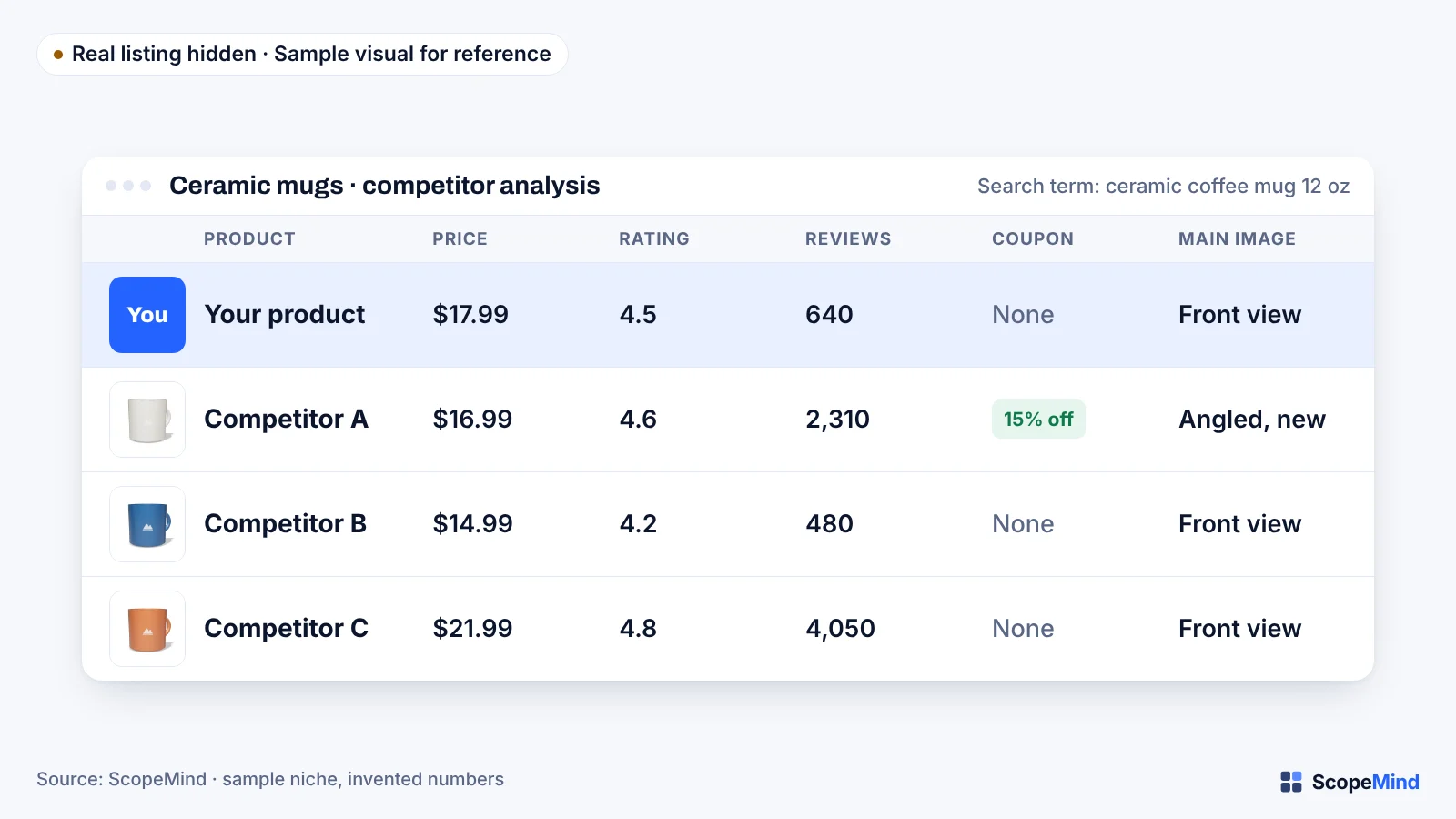
What is an Amazon competitor analysis?
It is a side-by-side comparison of your product with the products a shopper sees next to it in search results.
A shopper who types your main search term sees a page of similar products and picks one. A competitor analysis asks why they would pick each one: the price, the main image, the review count, the claims in the title, the coupon badge. Writing these down in one table shows where you are ahead, where you are behind, and where every listing looks the same.
The table is the starting point, not the result. The result is a short list of changes worth testing on your own listing.
Which competitors should you analyse?
Analyse the products that rank for your keywords at a similar price, because those are the ones shoppers compare you with.
- Write down the three to five search terms that bring you most of your sales.
- Search each term in a private browser window and note the products on page one that are a comparable product at a comparable price.
- Mark the products that appear on more than one of your terms. Those are your closest competitors.
- Add any sponsored product that shows up on several of your terms. A seller buying your keywords is competing for your shoppers.
- Keep five to ten products. Leave out products at twice your price or half of it, unless shoppers clearly choose between you.
A best seller in your category that ranks for none of your search terms does not belong in the table. It sells to a different shopper.
What goes in a competitor analysis template?
One row per product, your own first, and one column for each thing a shopper can see or that shows how the listing performs.
Copy the table below into a spreadsheet. Each line becomes a column, and each product a row. Fill in your own product first, so every other row is read against it.
| Column | What to write down | What it tells you |
|---|---|---|
| Price | Current price, and price per unit for packs | Where you sit in the range shoppers see |
| Coupon or deal | Coupon amount, deal badge, or none | Who is paying for a short push right now |
| Rating and review count | Star rating and number of ratings | How much trust the listing has built |
| Title | The first five words, and the main claim | Which search term and which benefit they lead with |
| Main image | What it shows: single item, pack, angle, accessories | What earns the click in search results |
| Other images and video | Number of images, video or not, and the topic of each | Which questions they answer before the shopper asks |
| Bullets | The claim each bullet makes, in a few words | Which benefits the niche treats as standard |
| A+ content | Yes or no, comparison chart or not, main message | How much the seller invests in the page |
| Best Sellers Rank | Rank and category, with the date | How each product sells compared with the others |
| Keyword positions | Position on each of your search terms, organic and sponsored apart | Where their traffic comes from, and what they pay for |
| Stock and sellers | In stock or not, and how many sellers offer it | Openings for you, and signs of a price war |
| Recent changes | What changed in the last 30 to 60 days, with dates | What they are testing, and whether it worked |
Read the low-star reviews of each competitor as well, and note the two or three complaints that come up again and again. A complaint shared by several competitors is the clearest opening in the niche.
How do you do an Amazon competitor analysis, step by step?
Choose the competitors, fill in the table, read it by column, add the history, and end with a list of tests.
- Choose your search terms. Three to five terms that describe your product the way shoppers search for it.
- Choose five to ten competitors from page one of those terms, as described above.
- Fill in the table for your own product, then for each competitor, all on the same day.
- Read down each column. Mark where you are the best, the worst, or the same as everyone. A column where every listing looks the same is a chance to stand out.
- Read the search results page as a shopper. Look at the main images and titles side by side, at phone size. Note which one your eye goes to first, and why.
- Add the history. For each competitor, note what changed recently and what happened to their rank afterwards.
- Write the action list. Three to five changes to test on your own listing, in order, each with the number you expect it to move.
Why is one day's comparison not enough?
Because a listing you see today is the result of earlier changes, and the changes are what you can learn from.
Two competitors can show the same price today. One has held it for a year. The other cut it last week, added a coupon and changed the main image, and its rank is climbing. The table treats them the same. Their history does not.
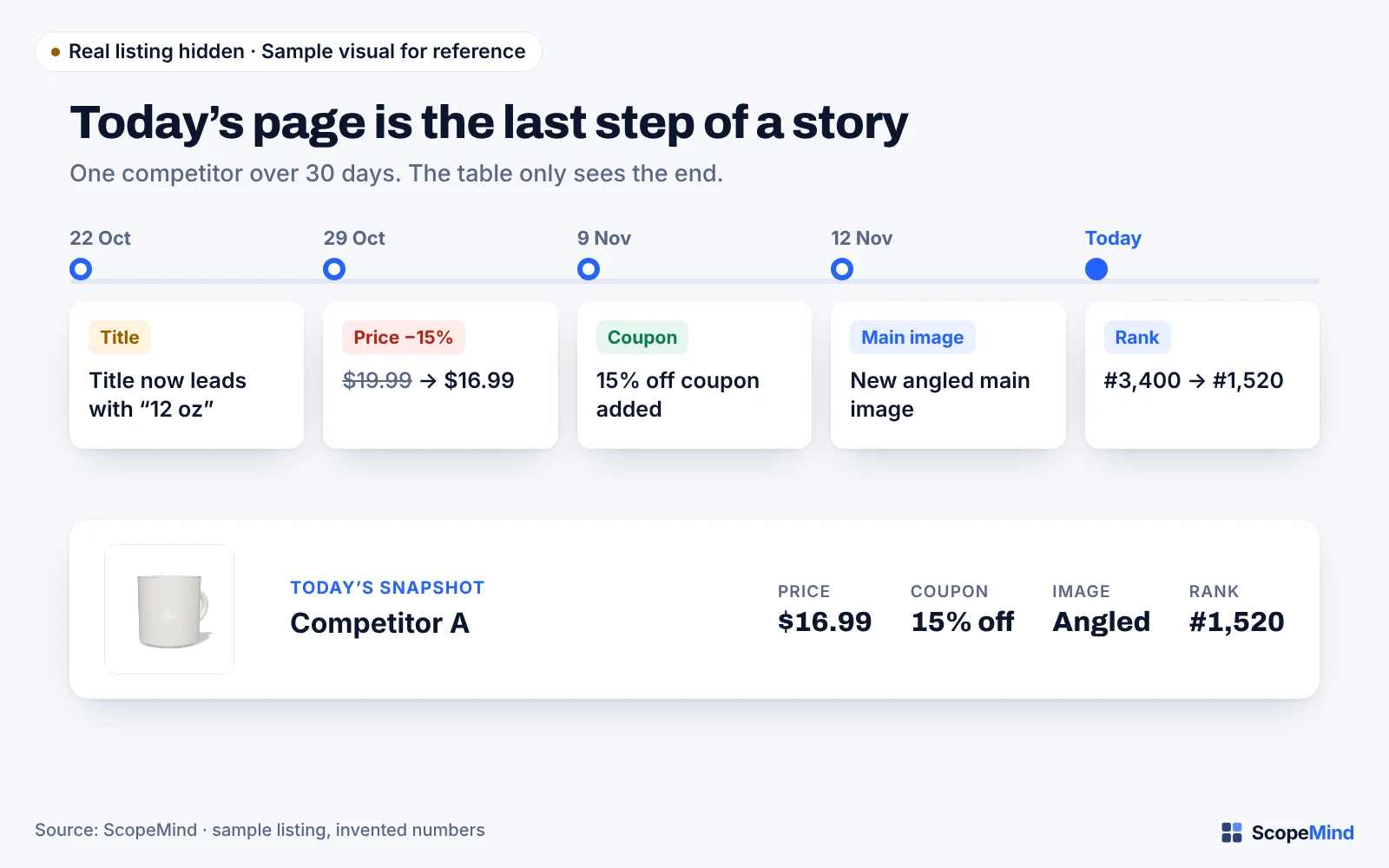
By hand, history means filling in the table again on a fixed day each week and comparing the rows. That works for a few products, but it misses anything that came and went between two checks, such as a four-day coupon.
ScopeMind keeps this history for you. You group the competitors into a niche, it records each listing every day, and the niche view shows every change with its date next to rank and keyword positions. The "Recent changes" column fills itself in. The longer guide on how to track your competitors' Amazon listings covers the daily routine in detail.
How do you turn the analysis into actions?
Match each gap in the table to one change on your own listing, and test the changes one at a time.
| What the table shows | What it suggests | A sensible first test |
|---|---|---|
| Your price is the highest, with fewer reviews | Shoppers have no reason yet to pay more | Show the reason in the main image and title before touching the price |
| Every main image looks the same | The click goes to price and stars | A main image that shows what is included, or the size, more clearly |
| Competitors lead their titles with a benefit you also have | The niche has agreed on what matters most | Move that benefit forward in your title or Item Highlights |
| Several competitors share the same complaint in reviews | An unmet need | If your product solves it, say so in an image and a bullet |
| A competitor ranks only through sponsored positions | They are buying visibility they have not earned yet | Hold your organic position; do not start a bidding war |
| A competitor's recent change was followed by a rank climb | That change worked for them | Test your own version of the idea, never a copy |
Change one thing at a time and give it two to three weeks. If you change the title, the main image and the price in the same week, you will not know which one moved your sales.
How often should you repeat the analysis?
Do the full comparison once a quarter, and keep watching for changes between rounds.
A niche does not change much from one week to the next, so a weekly full analysis is wasted effort. But it does change: new products arrive, a competitor rewrites a listing, prices drift. A quarterly round catches the slow shifts. Also run one before a big sales event and before any major rewrite of your own listing.
Between rounds, the useful question is narrower: what changed since last time? If nothing did, the last analysis still stands.
Frequently asked questions
- Can I do an Amazon competitor analysis for free?
- Yes. Everything in the template is on the public product page and in search results, so a spreadsheet and an hour are enough for a first analysis. What a free, by-hand analysis cannot give you is history: you only see the listing as it is on the day you look.
- How many competitors should an analysis cover?
- Five to ten per product. Fewer than five and one unusual listing skews the picture. More than ten and the table becomes too wide to read, and the products at the edges are rarely the ones shoppers compare you with.
- Can I see how much a competitor sells on Amazon?
- Not exactly. Amazon does not publish a seller's sales. Best Sellers Rank shows how a product sells compared with others in its category, so a rank that keeps improving is a fair sign that sales are growing, even without the number.
- How often should I redo my competitor analysis?
- Do the full comparison every quarter, and again before a big sales event or before you rewrite your own listing. In between, watch for changes. A daily check of what competitors changed keeps the analysis current without starting again.
- Is it allowed to copy what a competitor does well?
- You can learn from the idea, but not copy the content. Showing a size chart because a competitor's works is fine. Reusing their photos, their wording or their brand name in your listing is not, and it can get a listing removed.
Keep your competitor analysis up to date without redoing it
ScopeMind records your competitors' listings every day and shows what changed, next to their rank and yours.
Start tracking your niche